2018-8-22
PowerDesign 反向生成物理模型(Physical Data Model)
基于 ODBC数据源
-
(建立好ODBC数据源)
-
new Model -
database→change current DBMS(选择好对应的数据库,类型, 版本) -
database→update model from database(选择数据库对象 OK)
基于 JDBC
-
database→configure connections..→connection profile deinition→connect type(jdbc) -
配置jdk
tools→genernal options→vaniables
注意只支持 32bit JDK!!!
把jar, java, javac, javadoc的value值里面选择对应的位置 (它会目录生成 ev_start.bat 启动批处理?) 或者手动创建.
Set JAVA_HOME=C:\Program Files (x86)\Java\jdk1.8.0_251
Set JAR=C:\Program Files (x86)\Java\jdk1.8.0_251\bin\jar.exe
Set JAVA=C:\Program Files (x86)\Java\jdk1.8.0_251\bin\java.exe
Set JAVAC=C:\Program Files (x86)\Java\jdk1.8.0_251\bin\javac.exe
set JAVADOC=C:\Program Files (x86)\Java\jdk1.8.0_251\bin\javadoc.exe
Set CLASSPATH=F:\test\db_driver\mysql-connector-java-5.1.6.jar
./pdshell16.exe
踩坑
- CLASSPATH变量, 生成的ev_start是没有的,数据库驱动,需手动加上;
- 其次值不能带双引号
"; - 只设置
JAVA_HOME和CLASSPATH, 也是可以的;
连接配置
//sqlserver
net.sourceforge.jtds.jdbc.Driver
jdbc:jtds:sqlserver://127.0.0.1:1433/data_view;useUnicode=true;charset=GB2312;useLOBs=false
F:\test\db_driver\jtds-1.2.2.jar

//mysql
com.mysql.jdbc.Driver
jdbc:mysql://127.0.0.1:3306/eladmin?useUnicode=true&characterEncoding=utf8
F:\test\db_driver\mysql-connector-java-5.1.6.jar-
database→change current DBMS(选择好对应的数据库,类型, 版本) -
database→update model from database(选择数据库对象 OK)
Set JAVA_HOME=C:\Program Files (x86)\Java\jdk1.8.0_251 Set CLASSPATH=F:\yang\db_driver\mysql-connector-java-5.1.47.jar pdshell16.exe
PowerDesign 几种模型简介
PowerDesigner主要分为7种建模文件:
- 概念数据模型 (CDM)
对数据和信息进行, 利用实体-关系图(E-R图)的形式组织数据, 检验数据设计的有效性和合理性;
- 逻辑数据模型 (LDM)
PowerDesigner 15 新增的模型; 逻辑模型是概念模型的延伸, 表示概念之间的逻辑次序, 是一个属于方法层次的模型; 具体来说, 逻辑模型中一方面显示了实体, 实体的属性和实体之间的关系, 另一方面又将继承, 实体关系中的引用等在实体的属性中进行展示; 逻辑模型介于和物理模型之间, 具有物理模型方面的特性, 在概念模型中的多对多关系, 在逻辑模型中将会以增加中间实体的一对多关系的方式来实现;
逻辑模型主要是使得整个概念模型更易于理解, 同时又不依赖于具体的数据库实现, 使用逻辑模型可以生成针对具体数据库管理系统的; 逻辑模型并不是在整个步骤中必须的, 可以直接通过概念模型来生成物理模型;
- 物理数据模型 (PDM)
基于特定DBMS, 在概念数据模型, 逻辑的基础上进行设计; 由物理数据模型生成数据库, 或对数据库进行逆向工程得到物理数据模型;
- 面向对象模型 (OOM)
包含UML常见的所有的图形: 类图, 对象图, 包图, 用例图, 时序图, 协作图, 交互图, 活动图, 状态图, 组件图, 复合结构图, 部署图(配置图); OOM 本质上是软件系统的一个静态的概念模型;
- 业务程序模型 (BPM)
BPM 描述业务的各种不同内在任务和内在流程, 而且客户如何以这些任务和流程互相影响; BPM 是从业务合伙人的观点来看业务逻辑和规则的, 使用一个图表描述程序, 流程, 信息和合作协议之间的交互作用;
- 信息流模型(ILM)
ILM是一个高层的信息流模型, 主要用于分布式之间的数据复制;
- 企业架构模型(EAM):
从业务层, 应用层以及技术层的对企业的体系架构进行全方面的描述; 包括: 组织结构图, 业务通信图, 进程图, 城市规划图, 应用架构图, 面向服务图, 技术基础框架图;
面向对象模型 (OOM)
- Class图
跟uml类图类似
- 第一行格 是Name只是在powerdesigner显示的, 真正生成Java类名是properties里面的code
- 第二行格 是属性列, 主键属性有下划线
- 第一个字符 该属性的访问修饰符
+是 public;-private;#protect;*default - 第二列是Name,同样真正生成Java属性名是properties里面的code
- 第三列是分割: 符号后面显示java类型
- 第一个字符 该属性的访问修饰符
- 第三行格 是方法
- 多重性
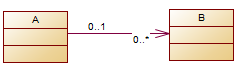
此图表示:
A 类有一个0个或者多个B
B 类有零个或者一个A
代码示例
class A {
   public java.util.Collection<B> b;
}
打开物理模型 → tool -> OOM generate Obj ... (16.5 以上才支持)
detail选项卡 取消掉convert names in codes
否则表的Name是中文的话那么类名就中文!!!
[configure model options]
可以配置一些转换参数:
default association container
修改默认的容器class attribute default visib...
修改属性默认访问修饰符
踩坑: 修改默认是java.util.Collection的问题, 以及属性访问修饰符, 是在PDM 转为OOM的时候修改!!!!! https://blog.csdn.net/jly4758/article/details/44780821
CDM 转 PDM
关联字段命名设置
Detail 选项卡 说明:
%.3:PARENTCOLUMN%_ 规则是:{父全名}{ID}_ %PARENT%%COLUMN% 规则是:{父全名}{ID} %PARENT%%COLUMN% 规则是:{父全名}{ID}
%PARENT%_%COLUMN%
各种设置
自增列
在表的属性对话框里面, 选择Clumns页, 按Ctrl+U,在Idenitity前面打上钩; 如有必要, 也可以将 ExtIdentityIncrement 和ExtIdentitySeed也打上勾, 这样在设定Idenitity时也可以直接指定起始值和步进值
新字段默认类型
tools → Model Options → Model Settings → Column & Domain > Default data type
关键词/Escape 字符修改
Database → Generate Database… → Format → Identifier delimiter: 下拉框
去掉参考线
tools → Display Preferces → SHOW PAGE DE..
启动关联线名称
tools→display preferences→object view →reference下把constraint name前的checkbox选上;
去掉code 唯一
Tools → Model Options Unique code 去掉
name 和 code 联动修改
Tools—General Options—Name to Code mirroring Tools → Model Options Allow reuse 去掉
修改 新字段的默认类型
新字段的默认是 <Undefined>
Tools→Model Options → Column &Domain 可定义默认字段类型及长度, 精度等;
各种脚本
模版脚本的官方说明, 自定义的一种 GTL (模版语言) The PowerDesigner Generation Template Language (GTL) is used to extract model object properties as text.
这一章节 关于格式化输入的预定义 Formatting Your Output
You can change the formatting of variables by embedding formatting options in variable syntax. New lines and tabs are specified using the \n and \t escape sequences respectively.
shift+ctrl+x
模型循环脚本
PDM
ValidationMode = True
InteractiveMode = im_Batch
Dim mdl ' the current model
' get the current active model
Set mdl = ActiveModel
If (mdl Is Nothing) Then
MsgBox "There is no current Model "
ElseIf Not mdl.IsKindOf(PdPDM.cls_Model) Then'非物理模型
MsgBox "The current model is not an Physical Data model. "
Else
ProcessModel mdl ' 调用函数
End If
' ==========
Private sub ProcessModel(mdl)
' 处理函数
ProcessFolder(mdl)
end sub
CDM
ValidationMode = True
InteractiveMode = im_Batch
' 当前模型的变量
Dim   mdl
' 获取当前活动的模型
Set   mdl = ActiveModel
If   (mdl   Is   Nothing)   Then
    MsgBox   "没有选择数据模型,请打开一个模型再执行脚本"
ElseIf   Not   mdl.IsKindOf(PdCDM.cls_Model)   Then
    MsgBox   "当前选择的不是一个概念数据模型(CDM) "
Else
    ProcessModel   mdl
End If

' ==========
Private sub ProcessModel(mdl)
' 处理函数
ProcessFolder(mdl)
end sub
将 comment 填充到 name
PDM
'把pd中那么name想自动添加到comment里面
'如果comment为空,则填入name;如果不为空,则保留不变,这样可以避免已有的注释丢失.

' This routine copy name into comment for each table, each column and each view
' of the current folder
Private sub ProcessFolder(folder)
Dim Tab 'running table

for each Tab in folder.tables

if not tab.isShortcut then

if trim(tab.comment)="" then '如果有表的注释,则不改变它.如果没有表注释.则把name添加到注释里面.
tab.comment = tab.name
end if

Dim col ' running column
for each col in tab.columns
if trim(col.comment)="" then '如果col的comment为空,则填入name,如果已有注释,则不添加;这样可以避免已有注释丢失.
col.comment= col.name
end if
next

end if
next

'Dim view 'running view
'for each view in folder.Views
'if not view.isShortcut and trim(view.comment)="" then
'view.comment = view.name
'end if
'next

' go into the sub-packages
Dim f ' running folder
For Each f In folder.Packages
if not f.IsShortcut then
ProcessFolder f
end if
Next
end sub
name 到 comment
Private sub ProcessFolder(folder)
Dim Tab 'running table
for each Tab in folder.tables
if not tab.isShortcut then
	tab.comment = tab.name
    Dim col ' running column
    for each col in tab.columns
        col.comment = col.name
    next
end if
next
' go into the sub-packages
Dim f ' running folder
For Each f In folder.Packages
if not f.IsShortcut then
ProcessFolder f
end if
Next
end sub
CDM
参考文档写一个 cdm 模型的
帮助搜 cls_Model 找到 CMD
BaseLogicalEntity
' 轮询当前模型下的所有实体表entity
Private   Sub   ProcessFolder(folder)
    Dim   entity
    For   Each   entity   In   folder.entities
        If   Not   entity.isShortcut Then
            '实体 comment > name
            entity.name = entity.comment
            Dim attribute
            For   Each   attribute   In   entity.attributes
                '字段 comment > name
                attribute.name = attribute.comment
            Next
        End If
    Next
    '递归处理子包中的表,否则只能取到第一个模型图内的表
    Dim   f
    For   Each   f   In   folder.Packages
        If   Not   f.IsShortcut   Then
            ProcessFolder   f
        End If
    Next
end sub
修改主键自增
Private Sub ProcessFolder(folder)
    Dim Tab 'running table
    For Each Tab In folder.Tables
        If Not Tab.IsShortcut Then
            Tab.Comment = Tab.Name
            Dim col ' running column
            For Each col In Tab.Columns
                ' 对于是主键且不是外键的字段设置为Identity(自增长类型)
                If col.Primary  And Not (col.ForeignKey) Then
                    col.Identity = True
                End If
            Next
        End If
    Next

    ' go into the sub-packages
    Dim f ' running folder
    For Each f In folder.Packages
        If Not f.IsShortcut Then
            ProcessFolder f
        End If
    Next
End Sub
批量追加字段
PDM
Private sub ProcessFolder(folder)
    On Error Resume Next
    Dim Tab 'running  table
    for each Tab in folder.tables
        if not tab.isShortcut then
        'if tab.comment="" then
        'tab.comment = tab.name
        'end if
        Dim isNeedAdd:isNeedAdd = true
        Dim col ' running column
        for each col in tab.columns
            if col.code="create_tm" then
            isNeedAdd = false
            end if
        next
        if isNeedAdd then
            Set col = tab.columns.CreateNew'创建字段
            If not col is Nothing then
            col.name = "创建人"
            col.comment = col.name
            col.code = "create_by"
            col.DataType = "datetime"
            output " col.name: " + col.name
            End If
            set col = nothing

            Set col = tab.columns.CreateNew
            If not col is Nothing then
            col.name = "创建时间"
            col.comment = col.name
            col.code = "create_date"
            col.DataType = "datetime"
            output " col.name: " + col.name
            End If
            set col = nothing

            Set col = tab.columns.CreateNew
            If not col is Nothing then
            col.name = "更新人"
            col.comment = col.name
            col.code = "update_by"
            col.DataType = "varchar(32)"
            output " col.name: " + col.name
            End If
            set col = nothing

            Set col = tab.columns.CreateNew
            If not col is Nothing then
            col.name = "更新时间"
            col.comment = col.name
            col.code = "update_date"
            col.DataType = "datetime"
            output " col.name: " + col.name
            End If
            set col = nothing
            end if
        end if
        next
        Dim view 'running view
        for each view in folder.Views
            if not view.isShortcut then
            view.name = view.comment
            end if
        next
        ' go into the sub-packages
        Dim f ' running folder
        For Each f In folder.Packages
            if not f.IsShortcut then
            ProcessFolder f
        end if
    Next
end sub
CDM
' 轮询当前模型下的所有实体表entity
Private   Sub   ProcessFolder(folder)
    Dim   entity
    For   Each   entity   In   folder.entities
        If   Not   entity.isShortcut Then
			'判断是否需要追加
			dim isNeedAdd:isNeedAdd= true
         dim attribute
			For   Each   attribute   In   entity.attributes
				if attribute.code="create_by" then
					isNeedAdd = false
					exit for
				end if
			Next
			dim attr
            '实体 add attribute
			if isNeedAdd Then
				Set attr = entity.attributes.CreateNew
				If not attr is Nothing then
            attr.name = "创建人"
            attr.comment = attr.name
				attr.code = "create_by"
				attr.DataType = "Variable characters(32)"
				End If
				Set attr = Nothing
				Set attr = entity.attributes.CreateNew
				If not attr is Nothing then
				attr.name = "创建时间"
            attr.comment = attr.name
				attr.code = "create_date"
				attr.DataType = "Date & Time"
				End If
				Set attr = Nothing
				Set attr = entity.attributes.CreateNew
				If not attr is Nothing then
            attr.name = "更新人"
            attr.comment = attr.name
				attr.code = "update_by"
				attr.DataType =  "Variable characters(32)"
				End If
				Set attr = Nothing
				Set attr = entity.attributes.CreateNew
				If not attr is Nothing then
            attr.name = "更新时间"
            attr.comment = attr.name
				attr.code = "update_date"
				attr.DataType = "Date & Time"
				End If

			end if
        End If
    Next
    '递归处理子包中的表,否则只能取到第一个模型图内的表
    Dim   f
    For   Each   f   In   folder.Packages
        If   Not   f.IsShortcut   Then
            ProcessFolder   f
        End If
    Next
end sub
修改字段&属性
(CDM)
' 轮询当前模型下的所有实体表entity
Private   Sub   ProcessFolder(folder)
    Dim   entity
    For   Each   entity   In   folder.entities
        If Not   entity.isShortcut Then
            dim attribute
            For   Each   attribute   In   entity.attributes
                if attribute.code="sta_" then
                    attribute.DataType = "Number (2)"
                elseif attribute.code="order_" then
                    attribute.DataType = "Number (5)"
                end if
			Next
        End If
    Next
    '递归处理子包中的表,否则只能取到第一个模型图内的表
    Dim   f
    For   Each   f   In   folder.Packages
        If   Not   f.IsShortcut   Then
            ProcessFolder   f
        End If
    Next
end sub
(PDM)
Private sub ProcessFolder(folder)
Dim Tab 'running table
for each Tab in folder.tables
if not tab.isShortcut then
    Dim col ' running column
    for each col in tab.columns
        ' numeric 转为 Integer
        if Left(col.datatype,7) = "numeric" Then
		 col.datatype = "int"
		end if
    next
end if
next
' go into the sub-packages
Dim f ' running folder
For Each f In folder.Packages
if not f.IsShortcut then
ProcessFolder f
end if
Next
end sub
主键字段comment 改为 实体name (CDM)
BaseLogicalEntity
' 轮询当前模型下的所有实体表entity
Private   Sub   ProcessFolder(folder)
    Dim   entity
    For   Each   entity   In   folder.entities
        If   Not   entity.isShortcut Then
            Dim attribute
            For   Each   attribute   In   entity.attributes
                if attribute.Primaryidentifier then
                    'MsgBox   entity.name+" 主键 ->"+attribute
                    '主键注释 改为 > 实体name
                     attribute.comment = entity.name
                    exit for
                end if
            Next
        End If
    Next
    '递归处理子包中的表,否则只能取到第一个模型图内的表
    Dim   f
    For   Each   f   In   folder.Packages
        If   Not   f.IsShortcut   Then
            ProcessFolder   f
        End If
    Next
end sub
修改 Relationships 名称(CDM)
...

' 多包, 必须全局!
dim index:index=1
dim pkPrefix
'处理所有包,否则只能取到第一个
Dim   f
For   Each   f   In   mdl.Packages
	If   Not   f.IsShortcut   Then
		pkPrefix= Left(f.DisplayName, 1)
		ProcessFolder   f
	End If
Next

Private   Sub   ProcessFolder(folder)
    Dim   relate
	' 轮询当前所有  relate
    For   Each   relate   In   folder.Relationships
        If   Not relate.isShortcut Then
            relate.name = "r_"+CStr(pkPrefix)+ "_" + CStr(index)
			relate.code =  relate.name
		    index = index+1
        End If
    Next
end sub
从Excel导入表
(PDM)
每个sheet页A1是表名中文,B1是表名英文。 A列是中文说明字段,B列是英文字段,C列是字段类型。
'导入Excel表结构
Option Explicit

Dim mdl ' the current model
Set mdl = ActiveModel
If (mdl Is Nothing) Then
   MsgBox "There is no Active Model"
End If
Dim HaveExcel
Dim RQ
RQ = vbYes 'MsgBox("Is Excel Installed on your machine ?", vbYesNo + vbInformation, "Confirmation")
If RQ = vbYes Then
   HaveExcel = True
   ' Open & Create Excel Document
   Dim x1  '
   Set x1 = CreateObject("Excel.Application")
   x1.Workbooks.Open "E:\content-for-work\all-temp\tabl_impo.xls"    '指定excel文档路径
Else
   HaveExcel = False
End If

a x1, mdl

Sub a(x1, mdl)
dim rwIndex
dim tableName
dim colname
dim table
dim col
dim count
dim sheetIndex

For sheetIndex = 1 To x1.Workbooks(1).Sheets.Count '指定要遍历的 Sheet
	x1.Workbooks(1).Worksheets(sheetIndex).Activate '指定要打开的sheet名称
	With x1.Workbooks(1).Worksheets(sheetIndex)
	For rwIndex = 1 To 200 step 1 '指定要遍历的Excel行标
		If .Cells(rwIndex, 1).Value = "" Then
		   Exit For
		End If
		If .Cells(rwIndex, 3).Value = "" Then '指定表名
		   set table = mdl.Tables.CreateNew
		   table.Name = .Cells(rwIndex , 1).Value
		   table.Code = .Cells(rwIndex , 2).Value
		   count = count + 1
		Else
		   'colName = .Cells(rwIndex, 1).Value
		   set col = table.Columns.CreateNew '创建列
		   'MsgBox .Cells(rwIndex, 1).Value, vbOK + vbInformation, "列"
		   col.Name = .Cells(rwIndex, 1).Value '指定列名
		   'MsgBox col.Name, vbOK + vbInformation, "列"
		   col.Code = .Cells(rwIndex, 2).Value '指定列code

		   col.Comment = .Cells(rwIndex,1).Value '指定列说明

		   col.DataType = .Cells(rwIndex, 3).Value '指定列数据类型

		   If .Cells(rwIndex, 4).Value = "否" Then
			  col.Mandatory = true'指定列是否可空,true为不可空
		   End If

		   If rwIndex = 2 Then
			  col.Primary = true'指定主键
		   End If
		End If
	Next
	End With
Next

MsgBox "生成数据表结构共计" + CStr(count), vbOK + vbInformation, "张表"

Exit Sub
End Sub
VB 正则替换
去掉name最后的_
//code=
.vbscript(%Name%)
ScriptResult = Replace(ScriptInputArray(0),"_$","")
Function Replace(src, patrn, replStr)
   Set regEx = New RegExp
   regEx.Pattern = patrn
   Replace = regEx.replace(src,replStr)
End Function
.endvbscript- 完整生成模版代码
.if(%PrimaryIdentifier%)
.//去掉主键
.else
.if (%Multiple%)
[%javaDocComment%\n]\
[%Parent.isClass%?[%visibility% ]][%flags% ]%dataType%\[\] %fieldCode%[ = %initialValue%];
.else
//
[%javaDocComment%\n]\
[%Parent.isClass%?[private]] [%flags% ]%dataType% %fieldCode%[ = %initialValue%];
@Column(name="%Name%")
public %dataType% get
.vbscript(%Name%)
dim first_, mid_, end_
first_ = UCase(Left(ScriptInputArray(0),1))
mod_ = Replace(ScriptInputArray(0),"^.","")
end_ = Replace(mod_,"_$","")
ScriptResult = first_ & end_
Function Replace(src, patrn, replStr)
   Set regEx = New RegExp
   regEx.Pattern = patrn
   Replace = regEx.replace(src,replStr)
End Function
.endvbscript
(){ return this.%Code%; }
public void set
.vbscript(%Name%)
dim first_, mid_, end_
first_ = UCase(Left(ScriptInputArray(0),1))
mod_ = Replace(ScriptInputArray(0),"^.","")
end_ = Replace(mod_,"_$","")
ScriptResult = first_ & end_
Function Replace(src, patrn, replStr)
   Set regEx = New RegExp
   regEx.Pattern = patrn
   Replace = regEx.replace(src,replStr)
End Function
.endvbscript
(%dataType% %Code%){ this.%Code% = %Code%;
}\n
.endif
.endif
代码生成模版设置 (java)
language -> edit current object language >
类定义模版
Java::Profile\Class\Templates\definition
继承模版
Java::Profile\Class\Templates\extends
.ifnot (%ChildGeneralizations.IsEmpty%)
   .if (%ChildGeneralizations.First.ParentObject.actualPackage.ObjectID% == %Package.ObjectID%)
extends %ChildGeneralizations.First.ParentObject.qualifiedCode% , IdEntity
   .else
extends %ChildGeneralizations.First.ParentObject.fullyQualifiedCode% ,IdEntity
   .endif
.else
extends IdEntity
.endif
目前项目都是ID继承自IdEntity, 都添加 ,IdEntity, 末尾.else 应该是没有继承的情况
类导入模版
添加继承,注解,别忘要导入类
import javax.persistence.Entity;
import javax.persistence.Table;
import javax.persistence.Column;
Java::Profile\Class\Templates\imports
包导入模版
没找到, 在类定义最上面直接改吧…
Java::Profile\Class\Templates\definition
字段模版
Java::Profile\Attribute\Templates\definition
.if(%PrimaryIdentifier%) 这是判断是否主键的表达式在Java::Profile\Attribute\Templates\Helpers\isPrimaryKeyField定义了
.if(%PrimaryIdentifier%)
//是主键就为空, 因为都是继承自IdEntity的生成方式. 不要主键字段
.else
.if (%Multiple%)
[%javaDocComment%\n]\
[%Parent.isClass%?[%visibility% ]][%flags% ]%dataType%\[\] %fieldCode%[ = %initialValue%];
.else
[%javaDocComment%\n]\
[%Parent.isClass%?[%visibility% ]][%flags% ]%dataType% %fieldCode%[ = %initialValue%];
.endif
.endif
其使用的注释: Java::Profile\Attribute\Templates\javaDoc
get,set模版
默认的PowerDesigner没有普通属性 java bean形式的get,set 模版!!
自己加到属性上面:Java::Profile\Attribute\Templates\definition
%.FU:Code% 首字母大写
加上先前的去主键, 完整代码
.if(%PrimaryIdentifier%)
.else
.if (%Multiple%)
[%javaDocComment%\n]\
[%Parent.isClass%?[%visibility% ]][%flags% ]%dataType%\[\] %fieldCode%[ = %initialValue%];
.else
[%javaDocComment%\n]\
[%Parent.isClass%?[private]] [%flags% ]%dataType% %fieldCode%[ = %initialValue%];\n//这里顺便把访问修饰符改了,有个坏处在视图改是无效的
@Column(name="%Name%")//只能以名称, 转换的时候,它把字段中间的_去掉了
public %dataType% get%.FU:Code%(){//get方法,首字母大写%.FU:Code%
   return this.%Code%;
}
public void set%.FU:Code%(%dataType% %Code%){//set方法
   this.%Code% = %Code%;
}
.endif
.endif
映射关联的 get,set模版
(?对多) 多的方的 get set
Java::Profile\Association\Templates\Helpers\Migrate\accessorsMany
.if (%implInterface%)
.// Get collection
.set_value(_operationName, get%.FU:roleName%, new)
.set_value(_operationSignature, get%.FU:roleName%, new)
.set_value(_memberName, %roleName%, new)
 .if (%endClassHasOperation% == false)
/** 获得 %roleName% 集合*/
@OneToMany(cascade=CascadeType.ALL,fetch=FetchType.LAZY,mappedBy = "%ClassA.QualifiedCode%")
public %implInterface% %_operationName%() \
{
   return %_memberName%;
}
 .endif(\n\n)
.// Set collection
.set_value(_operationName, set%.FU:roleName%, new)
.set_value(_operationSignature, set%.FU:roleName%@%implInterface%, new)
.set_value(_paramName, new%.FU:roleName%, new)
.set_value(_memberName, %roleName%, new)
 .if (%endClassHasOperation% == false)
/** 设置 %roleName% 集合
  * @param %_paramName% */
public void %_operationName%(java.util.List<%.FU:roleName%> %_paramName%) \
{
   this.%roleName%=%_paramName%;
}
 .endif(\n\n)
.endif
这个
%ClassA.QualifiedCode%是在Java::Profile\Association\Templates\Helpers\Migrate\roleATags,找的=.=
对应的字段模版
Java::Profile\Association\Templates\Helpers\Migrate\roleBMigratedAttributeMany 也改了访问修饰符
[%roleBTags%\n]\
.if (%roleBContainerType%)
[private ]%roleBContainerType%<%.FU:roleBCode%> %.FU:roleBCode%[ = %.A:RoleBInitialValue%];
.else
[%roleBVisibility% ][%roleBFlags% ]%ClassB.qualifiedCode%\[\] %roleBCode%[ = %.A:RoleBInitialValue%];
.endif
其使用的注释标签:
Java::Profile\Association\Templates\Helpers\Migrate\roleBTags
(?对一) 一方 的get set?
Java::Profile\Association\Templates\Helpers\Migrate\accessorsOne
.if ((%endNavigability%) and(%endContainerType%) and (%endMultiple%)) or (%isGenAssocDefaultAccessors%)
.// Parent getter
.set_value(_operationName, get%.FU:roleName%, new)
.set_value(_operationSignature, get%.FU:roleName%, new)
.if (%endClassHasOperation% == false)
/** get %.FU:Classifier.qualifiedCode% */
@ManyToOne
@JoinColumn(name="%ClassA.QualifiedCode%_id")
public %.FU:Classifier.qualifiedCode% get%.FU:roleName%() \
{
   return %roleName%;
}
.endif(\n\n)
.// Parent setter
.set_value(_operationName, set%.FU:roleName%)
.set_value(_operationSignature, set%.FU:roleName%@%Classifier.qualifiedCode%)
.if (%endClassHasOperation% == false)
/** set %.FU:roleName%
  * @param new%.FU:Classifier.Code% */
public void set%.FU:roleName%(%.FU:Classifier.qualifiedCode% new%.FU:Classifier.Code%) \
{
   this.%roleName% = new%.FU:Classifier.Code%;
}
.endif(\n\n)
.endif
对应的字段模版
Java::Profile\Association\Templates\Helpers\Migrate\roleAMigratedAttributeOne
[%roleATags%\n]\
[private ][%roleAFlags% ]%.FU:ClassA.qualifiedCode% %roleACode%[ = %.A:RoleAInitialValue%];
其使用的注释标签:
Java::Profile\Association\Templates\Helpers\Migrate\roleATags
部分参考: https://blog.csdn.net/wang13667539325/article/details/48141983
以上其实都可以直接做成一个独立的模板文件,用引用的方式,就不用东改西改了
物理模型PowerDesign 生成sql脚本
database → (Generate Database) format → Generate name in empty comment 复选框空注释时可将name 设为注释
UML类图
类(Class)
使用三层矩形框表示;
- 第一层显示类的名称, 如果是抽象类(接口), 则就用斜体显示;
- 第二层是字段和属性,
+是 public;-private;#protect;*default - 第三层是类的方法;
继承
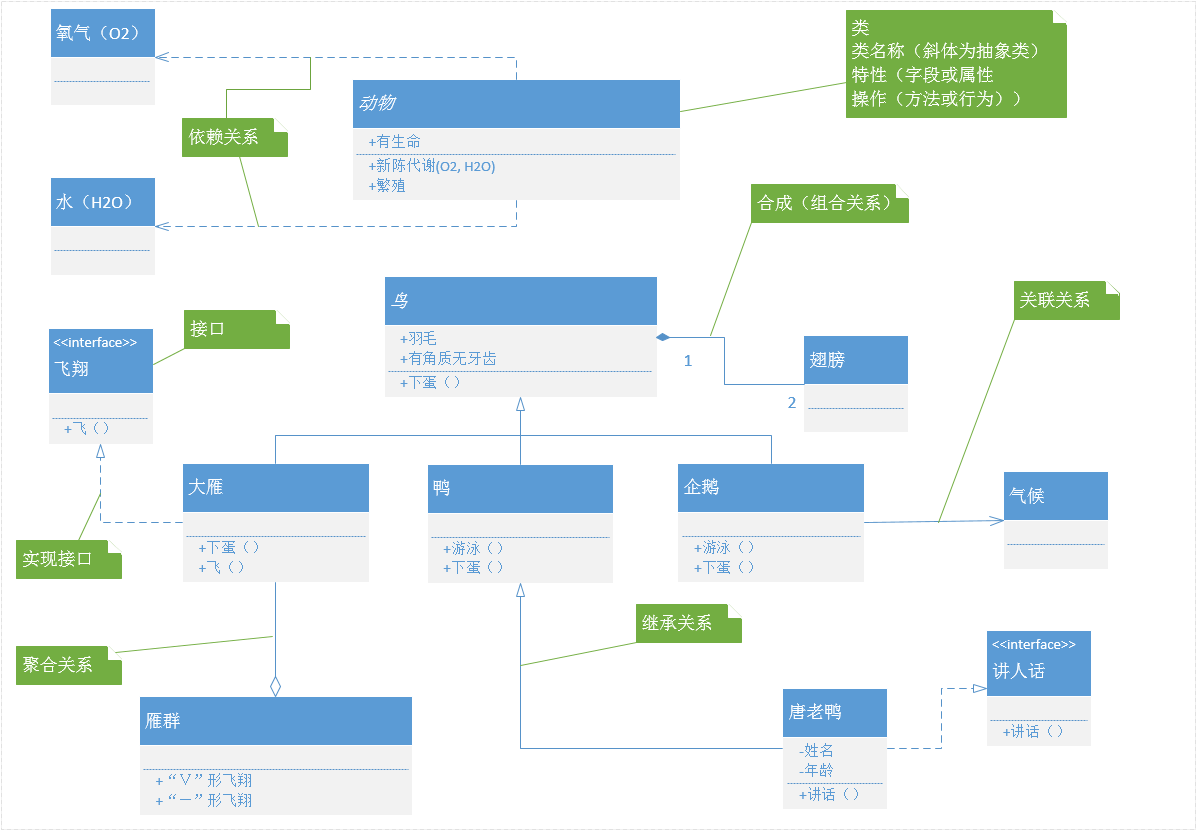
导致 Word卡顿
ms word 失去焦点后再进入会卡顿, 原因是它会装载一个插件, word去掉该加载项即可.