Flowable
https://www.flowable.com/ https://github.com/flowable/flowable-engine https://documentation.flowable.com/latest/develop/be-introduction flowable 用户手册 6.3.0
Flowable是一个使用Java编写的轻量级业务流程引擎。Flowable流程引擎可用于部署BPMN 2.0流程定义(用于定义流程的行业XML标准), 创建这些流程定义的流程实例,进行查询,访问运行中或历史的流程实例与相关数据,等等。
关键对象
本身就是从 activi 分支出来的, 基本可以参考 Activiti 关键对象 https://tkjohn.github.io/flowable-userguide/#apiEngine
ProcessEngine
引擎API是与Flowable交互的最常用手段。总入口点是ProcessEngine 使用ProcessEngine,可以获得各种提供工作流/BPM方法的服务。ProcessEngine与服务对象都是线程安全的,因此可以在服务器中保存并共用同一个引用。
创建 (Spring)
https://tkjohn.github.io/flowable-userguide/#_creating_a_process_engine
Flowable流程引擎通过名为flowable.cfg.xml的XML文件进行配置, flowable.cfg.xml文件中必须包含一个id为’processEngineConfiguration’的bean。
flowable.cfg.xml
<beans xmlns="http://www.springframework.org/schema/beans"
       xmlns:xsi="http://www.w3.org/2001/XMLSchema-instance"
       xsi:schemaLocation="http://www.springframework.org/schema/beans http://www.springframework.org/schema/beans/spring-beans.xsd">

  <bean id="processEngineConfiguration" class="org.flowable.engine.impl.cfg.StandaloneProcessEngineConfiguration">

    <property name="jdbcUrl" value="jdbc:h2:mem:flowable;DB_CLOSE_DELAY=1000" />
    <property name="jdbcDriver" value="org.h2.Driver" />
    <property name="jdbcUsername" value="sa" />
    <property name="jdbcPassword" value="" />

    <property name="databaseSchemaUpdate" value="true" />

    <property name="asyncExecutorActivate" value="false" />

    <property name="mailServerHost" value="mail.my-corp.com" />
    <property name="mailServerPort" value="5025" />
  </bean>

</beans>获取ProcessEngine
ProcessEngine processEngine = ProcessEngines.getDefaultProcessEngine()最简单的方式是使用org.flowable.engine.ProcessEngines类, 这样会从classpath寻找flowable.cfg.xml,并用这个文件中的配置构造引擎。
创建 (ProcessEngineConfiguration)
也可以通过编程方式使用配置文件,来构造ProcessEngineConfiguration对象
ProcessEngineConfiguration.
  createProcessEngineConfigurationFromResourceDefault();
  createProcessEngineConfigurationFromResource(String resource);
  createProcessEngineConfigurationFromResource(String resource, String beanName);
  createProcessEngineConfigurationFromInputStream(InputStream inputStream);
  createProcessEngineConfigurationFromInputStream(InputStream inputStream, String beanName);
所有的ProcessEngineConfiguration.createXXX()方法都返回 ProcessEngineConfiguration,并可以继续按需调整。调用buildProcessEngine()后,生成一个ProcessEngine:
ProcessEngine processEngine = ProcessEngineConfiguration.createStandaloneInMemProcessEngineConfiguration()
  .setDatabaseSchemaUpdate(ProcessEngineConfiguration.DB_SCHEMA_UPDATE_FALSE)
  .setJdbcUrl("jdbc:h2:mem:my-own-db;DB_CLOSE_DELAY=1000")
  .setAsyncExecutorActivate(false)
  .buildProcessEngine();
获取服务对象 Service
RuntimeService runtimeService = processEngine.getRuntimeService();
RepositoryService repositoryService = processEngine.getRepositoryService();
TaskService taskService = processEngine.getTaskService();
ManagementService managementService = processEngine.getManagementService();
IdentityService identityService = processEngine.getIdentityService();
HistoryService historyService = processEngine.getHistoryService();
FormService formService = processEngine.getFormService();
DynamicBpmnService dynamicBpmnService = processEngine.getDynamicBpmnService();
八个Service对象
| 类名 | 描述 |
|---|---|
| RepositoryService | 很可能是使用Flowable引擎要用的第一个服务。这个服务提供了管理与控制部署(deployments)与流程定义(process definitions)的操作。在这里简单说明一下,流程定义是BPMN 2.0流程对应的Java对象,体现流程中每一步的结构与行为。部署是Flowable引擎中的包装单元,一个部署中可以包含多个BPMN 2.0 XML文件及其他资源。开发者可以决定在一个部署中包含的内容,可以是单个流程的BPMN 2.0 XML文件,也可以包含多个流程及其相关资源(如’hr-processes’部署可以包含所有与人力资源流程相关的的东西)。RepositoryService可用于部署这样的包。部署意味着将它上传至引擎,引擎将在储存至数据库之前检查与分析所有的流程。在部署操作后,可以在系统中使用这个部署包,部署包中的所有流程都可以启动。此外,这个服务还可以: - 查询引擎现有的部署与流程定义。 - 暂停或激活部署中的某些流程,或整个部署。暂停意味着不能再对它进行操作,激活刚好相反,重新使它可以操作。 - 获取各种资源,比如部署中保存的文件,或者引擎自动生成的流程图。 - 获取POJO版本的流程定义。它可以用Java而不是XML的方式查看流程。 |
| RuntimeService | RuntimeService用于启动流程定义的新流程实例。流程定义中定义了流程中不同步骤的结构与行为。流程实例则是流程定义的实际执行过程。同一时刻,一个流程定义通常有多个运行中的实例。RuntimeService也用于读取与存储流程变量。流程变量是流程实例中的数据,可以在流程的许多地方使用(例如排他网关经常使用流程变量判断流程下一步要走的路径)。 |
| TaskService | 对于像Flowable这样的BPM引擎来说,核心是需要人类用户操作的任务。所有任务相关的东西都组织在TaskService中,例如: - 查询分派给用户或组的任务 - 创建_独立运行(standalone)_任务。这是一种没有关联到流程实例的任务。 - 决定任务的执行用户(assignee),或者将用户通过某种方式与任务关联。 - 认领(claim)与完成(complete)任务。认领是指某人决定成为任务的执行用户,也即他将会完成这个任务。完成任务是指“做这个任务要求的工作”,通常是填写某个表单。 |
| IdentityService | IdentityService很简单。它用于管理(创建,更新,删除,查询……)组与用户。请注意,Flowable实际上在运行时并不做任何用户检查。例如任务可以分派给任何用户,而引擎并不会验证系统中是否存在该用户。这是因为Flowable有时要与LDAP、Active Directory等服务结合使用。 |
| HistoryService | HistoryService暴露Flowable引擎收集的所有历史数据。当执行流程时,引擎会保存许多数据(可配置),例如流程实例启动时间、谁在执行哪个任务、完成任务花费的时间、每个流程实例的执行路径,等等。这个服务主要提供查询这些数据的能力。 |
| DynamicBpmnService | DynamicBpmnService可用于修改流程定义中的部分内容,而不需要重新部署它。例如可以修改流程定义中一个用户任务的办理人设置,或者修改一个服务任务中的类名。 |
| ManagementService | ManagementService通常在用Flowable编写用户应用时不需要使用。它可以读取数据库表与表原始数据的信息,也提供了对作业(job)的查询与管理操作。Flowable中很多地方都使用作业,例如定时器(timer),异步操作(asynchronous continuation),延时暂停/激活(delayed suspension/activation)等等。后续会详细介绍这些内容。 |
| FormService | FormService 是可选服务。也就是说Flowable没有它也能很好地运行,而不必牺牲任何功能。这个服务引入了_开始表单(start form)_与_任务表单(task form)_的概念。_开始表单_是在流程实例启动前显示的表单,而_任务表单_是用户完成任务时显示的表单。Flowable可以在BPMN 2.0流程定义中定义这些表单。表单服务通过简单的方式暴露这些数据。再次重申,表单不一定要嵌入流程定义,因此这个服务是可选的。 |
版本依赖
Flowable V7 runs on a Java higher than or equal to version 17. Use the JDK packaged with your Linux distribution or go to adoptium.net and click on the Latest LTS Release button. There are installation instructions on that page as well. To verify that your installation was successful, run java -version on the command line. That should print the installed version of your JDK.
Flowable V6 is still maintained and supports Java 8+.
jar
<dependency>
  <groupId>org.flowable</groupId>
  <artifactId>flowable-engine</artifactId>
  <version>7.0.1</version>
</dependency>
spring boot
<dependency>
    <groupId>org.flowable</groupId>
    <artifactId>flowable-spring-boot-starter</artifactId>
    <version>${flowable.version}</version>
</dependency>
v7.0 + 貌似只支持Spring Boot 3; v6.0支持 Spring Boot 2
Flowable 定义 with BPMN 2.0
任务
任务:任务是业务流程中的一个基本单元,它代表了一个工作步骤或要完成的实际工作。任务通常是执行者(人或系统)需要完成的具体行动。
- 用户任务(User Task):需要人工干预的任务。 https://tkjohn.github.io/flowable-userguide/#bpmnUserTask
assignee(办理人)属性:这个自定义扩展用于直接将用户指派至用户任务。
<userTask id="theTask" name="my task" flowable:assignee="kermit" />

candidateUsers(候选用户)属性:这个自定义扩展用于为任务指定候选用户。
<userTask id="theTask" name="my task" flowable:candidateUsers="kermit, gonzo" />


candidateGroups(候选组)attribute:这个自定义扩展用于为任务指定候选组。
<userTask id="theTask" name="my task" flowable:candidateGroups="management, accountancy" />
- 服务任务(Service Task):自动执行的任务,通常与外部系统或服务交互。 有四种方法声明如何调用Java逻辑:
- 指定实现了JavaDelegate或ActivityBehavior的类
- 调用解析为委托对象(delegation object)的表达式
- 调用方法表达式(method expression)
- 对值表达式(value expression)求值 使用flowable:class属性提供全限定类名(fully qualified classname),指定流程执行时调用的类。
<serviceTask id="javaService"
             name="My Java Service Task"
flowable:class="org.flowable.MyJavaDelegate" />- 接收任务(Receive Task):等待接收消息或数据的任务。
- 发送任务(Send Task):发送消息或数据的任务。
使用了一个
executionListener来在Send Task开始时触发一个自定义的Java类SendNotificationListener
<sendTask id="sendTaskId" name="Send Notification">
 <!-- 消息定义,可以定义消息名称和目标 -->
 <extensionElements>
   <flowable:executionListener event="start" class="com.yourcompany.SendNotificationListener"/>
 </extensionElements>
</sendTask>- 手工任务(Manual Task):需要人工手动完成的任务。
- 脚本任务(Script Task):通过脚本自动化完成的任务。
- 业务规则任务(Business Rule Task):应用业务规则的任务。
事件
TODO
Flowable with spring boot
文档 7.0+ 集成 Spring 集成 Spring Boot
依赖 - 约定配置
<dependency>
    <groupId>org.flowable</groupId>
    <artifactId>flowable-spring-boot-starter</artifactId>
    <version>${flowable.version}</version>
</dependency>
So, by just adding the dependency to the classpath and using the @SpringBootApplication annotation a lot has happened behind the scenes:
- An in-memory datasource is created automatically (because the H2 driver is on the classpath) and passed to the Flowable process engine configuration (如有 spring.datasource 则会使用它)
- A Flowable ProcessEngine, CmmnEngine, DmnEngine and IdmEngine beans have been created and exposed
- All the Flowable services are exposed as Spring beans
- The Spring Job Executor is created Also:
- Any BPMN 2.0 process definitions in the processes folder will be automatically deployed. Create a folder processes and add a dummy process definition (named
one-task-process.bpmn20.xml) to this folder. The content of this file is shown below. - Any CMMN 1.1 case definitions in the cases folder will be automatically deployed.
- Any DMN 1.1 dmn definitions in the dmn folder will be automatically deployed.
数据库策略
spring:
  datasource:
    url: xxx
    username: xxx
    password: xxx
    driver-class-name: xxx
  liquibase:
	# 禁用 Flowable引擎使用Liquibase管理数据库版本。 因此Spring Boot的 `LiquibaseAutoConfiguration` 会自动启用
    enabled: false
# flowable 工作流配置
flowable:
  # 关闭定时任务JOB
  async-executor-activate: false
  # 数据库更新策略
  database-schema-update: true
database-schema-update: true 数据库更新策略,其取值有四个:
flase: 默认值。activiti在启动时,会对比数据库表中保存的版本,如果没有表或者版本不匹配,将抛出异常。(生产环境常用)
true: activiti会对数据库中所有表进行更新操作。如果表不存在,则自动创建。(开发时常用)
create-drop: 在启动时清库 !(必须手动关闭引擎,才能删除表)。(单元测试常用)
drop-create: 在启动时清库 ! 然后在创建新表(不需要手动关闭引擎)。
自定义配置
实现 org.flowable.spring.boot.EngineConfigurationConfigurer<T> 接口,可以获取引擎配置对象。其中_T_是具体引擎配置的Spring类型。 这样可以在参数尚未公开时,进行高级配置,或简化配置。 例如:
/**
 * @author yangfh
 * @date 2024/6/27 10:51
 **/
@Configuration
public class MySpringProcessEngineConfiguration implements EngineConfigurationConfigurer<SpringProcessEngineConfiguration> {

    @Override
    public void configure(SpringProcessEngineConfiguration springProcessEngineConfiguration) {
        //禁止 表达式访问 Spring bean
        springProcessEngineConfiguration.setBeans(Collections.EMPTY_MAP);
    }
}
自动部署
使用SpringProcessEngineConfiguration中的额外参数+deploymentMode+,定制部署的方式。这个参数定义了对于一组符合过滤器的资源,组织部署的方式。默认这个参数有3个可用值:
default: 将所有资源组织在一个部署中,整体用于重复检测过滤。这是默认值,在未设置这个参数时也会用这个值。single-resource: 为每个资源创建一个单独的部署,并用于重复检测过滤。如果希望单独部署每一个流程定义,并且只有在它发生变化时才创建新的流程定义版本,就应该使用这个值。resource-parent-folder: 为同一个目录下的资源创建一个单独的部署,并用于重复检测过滤。这个参数值可以为大多数资源创建独立的部署。同时仍可以通过将部分资源放在同一个目录下,将它们组织在一起。这里有一个将deploymentMode设置为single-resource的例子:
Flowable 配置 参数
https://documentation.flowable.com/latest/develop/dbs/overview https://tkjohn.github.io/flowable-userguide/#springBootFlowableProperties https://github.com/flowable/flowable-engine/blob/main/modules/flowable-spring-boot/flowable-spring-boot-starters/flowable-spring-boot-autoconfigure/src/main/java/org/flowable/spring/boot/FlowableProperties.java
# ===================================================================
# Common Flowable Spring Boot Properties
# 通用Flowable Spring Boot参数
#
# This sample file is provided as a guideline. Do NOT copy it in its
# entirety to your own application.	           ^^^
# 本示例文件只作为指导。请不要直接拷贝至你自己的应用中。
# ===================================================================

# Core (Process) FlowableProperties
# 核心(流程)
flowable.check-process-definitions=true # 是否需要自动部署流程定义。
flowable.custom-mybatis-mappers= # 需要添加至引擎的自定义Mybatis映射的FQN。
flowable.custom-mybatis-x-m-l-mappers= # 需要添加至引擎的自定义Mybatis XML映射的路径。
flowable.database-schema= # 如果数据库返回的元数据不正确,可以在这里设置schema用于检测/生成表。
flowable.database-schema-update=true # 数据库schema更新策略。
flowable.db-history-used=true # 是否要使用db历史。
flowable.deployment-name=SpringBootAutoDeployment # 自动部署的名称。
flowable.history-level= # 要使用的历史级别。
flowable.process-definition-location-prefix=classpath*:/processes/ # 自动部署时查找流程的目录。
flowable.process-definition-location-suffixes=**.bpmn20.xml,**.bpmn # 'processDefinitionLocationPrefix'路径下需要部署的文件的后缀(扩展名)。

# Process FlowableProcessProperties
# 流程
flowable.process.definition-cache-limit=-1 # 流程定义缓存中保存流程定义的最大数量。默认值为-1(缓存所有流程定义)。
flowable.process.enable-safe-xml=true # 在解析BPMN XML文件时进行额外检查。参见 https://www.flowable.org/docs/userguide/index.html#advanced.safe.bpmn.xml 。不幸的是,部分平台(JDK 6,JBoss)上无法使用这个功能,因此如果你所用的平台在XML解析时不支持StaxSource,需要禁用这个功能。
flowable.process.servlet.load-on-startup=-1 # 启动时加载Process servlet。
flowable.process.servlet.name=Flowable BPMN Rest API # Process servlet的名字。
flowable.process.servlet.path=/process-api # Process servelet的context path。

# Process Async Executor
# 流程异步执行器
flowable.process.async-executor-activate=true # 是否启用异步执行器。
flowable.process.async.executor.async-job-lock-time-in-millis=300000 # 异步作业在被异步执行器取走后的锁定时间(以毫秒计)。在这段时间内,其它异步执行器不会尝试获取及锁定这个任务。
flowable.process.async.executor.default-async-job-acquire-wait-time-in-millis=10000 # 异步作业获取线程在进行下次获取查询前的等待时间(以毫秒计)。只在当次没有取到新的异步作业,或者只取到很少的异步作业时生效。默认值 = 10秒。
flowable.process.async.executor.default-queue-size-full-wait-time-in-millis=0 # 异步作业(包括定时器作业与异步执行)获取线程在队列满时,等待执行下次查询的等待时间(以毫秒计)。默认值为0(以向后兼容)
flowable.process.async.executor.default-timer-job-acquire-wait-time-in-millis=10000 # 定时器作业获取线程在进行下次获取查询前的等待时间(以毫秒计)。只在当次没有取到新的定时器作业,或者只取到很少的定时器作业时生效。默认值 = 10秒。
flowable.process.async.executor.max-async-jobs-due-per-acquisition=1 # (译者补)单次查询的异步作业数量。默认值为1,以降低乐观锁异常的可能性。除非你知道自己在做什么,否则请不要修改这个值。
flowable.process.async.executor.retry-wait-time-in-millis=500 # ???(译者补不了了)
flowable.process.async.executor.timer-lock-time-in-millis=300000 # 定时器作业在被异步执行器取走后的锁定时间(以毫秒计)。在这段时间内,其它异步执行器不会尝试获取及锁定这个任务。


# CMMN FlowableCmmnProperties
flowable.cmmn.deploy-resources=true # 是否部署资源。默认值为'true'。
flowable.cmmn.deployment-name=SpringBootAutoDeployment # CMMN资源部署的名字。
flowable.cmmn.enable-safe-xml=true # 在解析CMMN XML文件时进行额外检查。参见 https://www.flowable.org/docs/userguide/index.html#advanced.safe.bpmn.xml 。不幸的是,部分平台(JDK 6,JBoss)上无法使用这个功能,因此如果你所用的平台在XML解析时不支持StaxSource,需要禁用这个功能。
flowable.cmmn.enabled=true # 是否启用CMMN引擎。
flowable.cmmn.resource-location=classpath*:/cases/ # CMMN资源的路径。
flowable.cmmn.resource-suffixes=**.cmmn,**.cmmn11,**.cmmn.xml,**.cmmn11.xml # 需要扫描的资源后缀名。
flowable.cmmn.servlet.load-on-startup=-1 # 启动时加载CMMN servlet。
flowable.cmmn.servlet.name=Flowable CMMN Rest API # CMMN servlet的名字。
flowable.cmmn.servlet.path=/cmmn-api # CMMN servlet的context path。

# CMMN Async Executor
# CMMN异步执行器
flowable.cmmn.async-executor-activate=true # 是否启用异步执行器。
flowable.cmmn.async.executor.async-job-lock-time-in-millis=300000 # 异步作业在被异步执行器取走后的锁定时间(以毫秒计)。在这段时间内,其它异步执行器不会尝试获取及锁定这个任务。
flowable.cmmn.async.executor.default-async-job-acquire-wait-time-in-millis=10000 # 异步作业获取线程在进行下次获取查询前的等待时间(以毫秒计)。只在当次没有取到新的异步作业,或者只取到很少的异步作业时生效。默认值 = 10秒。
flowable.cmmn.async.executor.default-queue-size-full-wait-time-in-millis=0 # 异步作业(包括定时器作业与异步执行)获取线程在队列满时,等待执行下次查询的等待时间(以毫秒计)。默认值为0(以向后兼容)
flowable.cmmn.async.executor.default-timer-job-acquire-wait-time-in-millis=1000 # 定时器作业获取线程在进行下次获取查询前的等待时间(以毫秒计)。只在当次没有取到新的定时器作业,或者只取到很少的定时器作业时生效。默认值 = 10秒。
flowable.cmmn.async.executor.max-async-jobs-due-per-acquisition=1 # (译者补)单次查询的异步作业数量。默认值为1,以降低乐观锁异常的可能性。除非你知道自己在做什么,否则请不要修改这个值。
flowable.cmmn.async.executor.retry-wait-time-in-millis=500 #(译者补不了了)
flowable.cmmn.async.executor.timer-lock-time-in-millis=300000 # 定时器作业在被异步执行器取走后的锁定时间(以毫秒计)。在这段时间内,其它异步执行器不会尝试获取及锁定这个任务。

# Content FlowableContentProperties
flowable.content.enabled=true # 是否启动Content引擎。
flowable.content.servlet.load-on-startup=-1 # 启动时加载Content servlet。
flowable.content.servlet.name=Flowable Content Rest API # Content servlet的名字。
flowable.content.servlet.path=/content-api # Content servlet的context path。
flowable.content.storage.create-root=true # 如果根路径不存在,是否需要创建?
flowable.content.storage.root-folder= # 存储content文件(如上传的任务附件,或表单文件)的根路径。

# DMN FlowableDmnProperties
flowable.dmn.deploy-resources=true # 是否部署资源。默认为'true'。
flowable.dmn.deployment-name=SpringBootAutoDeployment # DMN资源部署的名字。
flowable.dmn.enable-safe-xml=true # 在解析DMN XML文件时进行额外检查。参见 https://www.flowable.org/docs/userguide/index.html#advanced.safe.bpmn.xml 。不幸的是,部分平台(JDK 6,JBoss)上无法使用这个功能,因此如果你所用的平台在XML解析时不支持StaxSource,需要禁用这个功能。
flowable.dmn.enabled=true # 是否启用DMN引擎。
flowable.dmn.history-enabled=true # 是否启用DMN引擎的历史。
flowable.dmn.resource-location=classpath*:/dmn/ # DMN资源的路径。
flowable.dmn.resource-suffixes=**.dmn,**.dmn.xml,**.dmn11,**.dmn11.xml # 需要扫描的资源后缀名。
flowable.dmn.servlet.load-on-startup=-1 # 启动时加载DMN servlet。
flowable.dmn.servlet.name=Flowable DMN Rest API # DMN servlet的名字。
flowable.dmn.servlet.path=/dmn-api # DMN servlet的context path。
flowable.dmn.strict-mode=true # 如果希望避免抉择表命中策略检查导致失败,可以将本参数设置为false。如果检查发现了错误,会直接返回错误前一刻的中间结果。

# Form FlowableFormProperties
flowable.form.deploy-resources=true # 是否部署资源。默认为'true'。
flowable.form.deployment-name=SpringBootAutoDeployment # Form资源部署的名字。
flowable.form.enabled=true # 是否启用Form引擎。
flowable.form.resource-location=classpath*:/forms/ # Form资源的路径。
flowable.form.resource-suffixes=**.form # 需要扫描的资源后缀名。
flowable.form.servlet.load-on-startup=-1 # 启动时加载Form servlet。
flowable.form.servlet.name=Flowable Form Rest API # Form servlet的名字。
flowable.form.servlet.path=/form-api # Form servlet的context path。

# IDM FlowableIdmProperties
flowable.idm.enabled=true # 是否启用IDM引擎。
flowable.idm.password-encoder= # 使用的密码编码类型。
flowable.idm.servlet.load-on-startup=-1 # 启动时加载IDM servlet。
flowable.idm.servlet.name=Flowable IDM Rest API # IDM servlet的名字。
flowable.idm.servlet.path=/idm-api # IDM servlet的context path。

# IDM Ldap FlowableLdapProperties
flowable.idm.ldap.attribute.email= # 用户email的属性名。
flowable.idm.ldap.attribute.first-name= # 用户名字的属性名。
flowable.idm.ldap.attribute.group-id= # 用户组ID的属性名。
flowable.idm.ldap.attribute.group-name= # 用户组名的属性名。
flowable.idm.ldap.attribute.group-type= # 用户组类型的属性名。
flowable.idm.ldap.attribute.last-name= # 用户姓的属性名。
flowable.idm.ldap.attribute.user-id= # 用户ID的属性名。
flowable.idm.ldap.base-dn= # 查找用户与组的DN(标志名称 distinguished name)。
flowable.idm.ldap.cache.group-size=-1 # 设置{@link org.flowable.ldap.LDAPGroupCache}的大小。这是LRU缓存,用于缓存用户及组,以避免每次都查询LDAP系统。
flowable.idm.ldap.custom-connection-parameters= # 用于设置所有没有专用setter的LDAP连接参数。查看 http://docs.oracle.com/javase/tutorial/jndi/ldap/jndi.html 介绍的自定义参数。参数包括配置链接池,安全设置,等等。
flowable.idm.ldap.enabled=false # 是否启用LDAP IDM 服务。
flowable.idm.ldap.group-base-dn= # 组查找的DN。
flowable.idm.ldap.initial-context-factory=com.sun.jndi.ldap.LdapCtxFactory # 初始化上下文工厂的类名。
flowable.idm.ldap.password= # 连接LDAP系统的密码。
flowable.idm.ldap.port=-1 # LDAP系统的端口。
flowable.idm.ldap.query.all-groups= # 查询所有组所用的语句。
flowable.idm.ldap.query.all-users= # 查询所有用户所用的语句。
flowable.idm.ldap.query.groups-for-user= # 按照指定用户查询所属组所用的语句
flowable.idm.ldap.query.user-by-full-name-like= # 按照给定全名查找用户所用的语句。
flowable.idm.ldap.query.user-by-id= # 按照userId查找用户所用的语句。
flowable.idm.ldap.search-time-limit=0 # 查询LDAP的超时时间(以毫秒计)。默认值为'0',即“一直等待”。
flowable.idm.ldap.security-authentication=simple # 连接LDAP系统所用的'java.naming.security.authentication'参数的值。
flowable.idm.ldap.server= # LDAP系统的主机名。如'ldap://localhost'。
flowable.idm.ldap.user= # 连接LDAP系统的用户ID。
flowable.idm.ldap.user-base-dn= # 查找用户的DN。

# Flowable Mail FlowableMailProperties
flowable.mail.server.default-from=flowable@localhost # 发送邮件时使用的默认发信人地址。
flowable.mail.server.host=localhost # 邮件服务器。
flowable.mail.server.password= # 邮件服务器的登录密码。
flowable.mail.server.port=1025 # 邮件服务器的端口号。
flowable.mail.server.use-ssl=false # 是否使用SSL/TLS加密SMTP传输连接(即SMTPS/POPS)。
flowable.mail.server.use-tls=false # 使用或禁用STARTTLS加密。
flowable.mail.server.username= # 邮件服务器的登录用户名。如果为空,则不需要登录。

# Actuator
management.endpoint.flowable.cache.time-to-live=0ms # 缓存响应的最大时间。
management.endpoint.flowable.enabled=true # 是否启用flowable端点。
流程实例
https://tkjohn.github.io/flowable-userguide/#_creating_a_process_engine https://tkjohn.github.io/flowable-userguide/#_deploying_a_process_definition
我们要构建的流程是一个非常简单的请假流程。Flowable引擎需要流程定义为BPMN 2.0格式,这是一个业界广泛接受的XML标准。 在Flowable术语中,我们将其称为一个流程定义(process definition)。一个_流程定义_可以启动多个流程实例(process instance)。_流程定义_可以看做是重复执行流程的蓝图。 在这个例子中,_流程定义_定义了请假的各个步骤,而一个_流程实例_对应某个雇员提出的一个请假申请。
BPMN 2.0存储为XML,并包含可视化的部分:使用标准方式定义了每个步骤类型(人工任务,自动服务调用,等等)如何呈现,以及如何互相连接。这样BPMN 2.0标准使技术人员与业务人员能用双方都能理解的方式交流业务流程。
我们要使用的流程定义为:
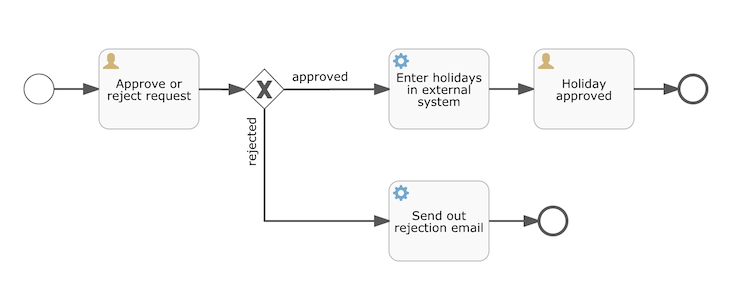
这个流程应该已经十分自我解释了。但为了明确起见,说明一下几个要点:
- 我们假定启动流程需要提供一些信息,例如雇员名字、请假时长以及说明。当然,这些可以单独建模为流程中的第一步。 但是如果将它们作为流程的“输入信息”,就能保证只有在实际请求时才会建立一个流程实例。否则(将提交作为流程的第一步),用户可能在提交之前改变主意并取消,但流程实例已经创建了。 在某些场景中,就可能影响重要的指标(例如启动了多少申请,但还未完成),取决于业务目标。
- 左侧的圆圈叫做启动事件(start event)。这是一个流程实例的起点。
- 第一个矩形是一个用户任务(user task)。这是流程中人类用户操作的步骤。在这个例子中,经理需要批准或驳回申请。
- 取决于经理的决定,排他网关(exclusive gateway) (带叉的菱形)会将流程实例路由至批准或驳回路径。
- 如果批准,则需要将申请注册至某个外部系统,并跟着另一个用户任务,将经理的决定通知给申请人。当然也可以改为发送邮件。
- 如果驳回,则为雇员发送一封邮件通知他。
<?xml version="1.0" encoding="UTF-8"?>
<definitions xmlns="http://www.omg.org/spec/BPMN/20100524/MODEL"
  xmlns:xsi="http://www.w3.org/2001/XMLSchema-instance"
  xmlns:xsd="http://www.w3.org/2001/XMLSchema"
  xmlns:bpmndi="http://www.omg.org/spec/BPMN/20100524/DI"
  xmlns:omgdc="http://www.omg.org/spec/DD/20100524/DC"
  xmlns:omgdi="http://www.omg.org/spec/DD/20100524/DI"
  xmlns:flowable="http://flowable.org/bpmn"
  typeLanguage="http://www.w3.org/2001/XMLSchema"
  expressionLanguage="http://www.w3.org/1999/XPath"
  targetNamespace="http://www.flowable.org/processdef">

  <process id="holidayRequest" name="Holiday Request" isExecutable="true">

    <startEvent id="startEvent"/>
    <sequenceFlow sourceRef="startEvent" targetRef="approveTask"/>

    <userTask id="approveTask" name="Approve or reject request"/>
    <sequenceFlow sourceRef="approveTask" targetRef="decision"/>

    <exclusiveGateway id="decision"/>
    <sequenceFlow sourceRef="decision" targetRef="externalSystemCall">
      <conditionExpression xsi:type="tFormalExpression">
        <![CDATA[
          ${approved}
        ]]>
      </conditionExpression>
    </sequenceFlow>
    <sequenceFlow  sourceRef="decision" targetRef="sendRejectionMail">
      <conditionExpression xsi:type="tFormalExpression">
        <![CDATA[
          ${!approved}
        ]]>
      </conditionExpression>
    </sequenceFlow>

    <serviceTask id="externalSystemCall" name="Enter holidays in external system"
        flowable:class="org.flowable.CallExternalSystemDelegate"/>
    <sequenceFlow sourceRef="externalSystemCall" targetRef="holidayApprovedTask"/>

    <userTask id="holidayApprovedTask" name="Holiday approved"/>
    <sequenceFlow sourceRef="holidayApprovedTask" targetRef="approveEnd"/>

    <serviceTask id="sendRejectionMail" name="Send out rejection email"
        flowable:class="org.flowable.SendRejectionMail"/>
    <sequenceFlow sourceRef="sendRejectionMail" targetRef="rejectEnd"/>

    <endEvent id="approveEnd"/>

    <endEvent id="rejectEnd"/>

  </process>

</definitions>
流程部署
RepositoryService repositoryService = processEngine.getRepositoryService();
Deployment deployment = repositoryService.createDeployment()
  .addClasspathResource("holiday-request.bpmn20.xml")
  .deploy();
开始流程实例
接下来,我们使用_RuntimeService_启动一个_流程实例_。收集的数据作为一个_java.util.Map_实例传递,其中的键就是之后用于获取变量的标识符。这个流程实例使用_key_启动。这个_key_就是BPMN 2.0 XML文件中设置的_id_属性,在这个例子里是 holidayRequest。
<process id="holidayRequest" name="Holiday Request" isExecutable="true">RuntimeService runtimeService = processEngine.getRuntimeService();
Map<String, Object> variables = new HashMap<String, Object>();
variables.put("employee", employee);// 实例变量, 网关可以通过表达式访问这个变量, 决定实例路由流向
variables.put("nrOfHolidays", nrOfHolidays);
variables.put("description", description);
ProcessInstance processInstance =
runtimeService.startProcessInstanceByKey("holidayRequest", variables);在流程实例启动后,会创建一个执行(execution),并将其放在启动事件上。从这里开始,这个_执行_沿着顺序流移动到经理审批的用户任务,并执行用户任务行为。这个行为将在数据库中创建一个任务,该任务可以之后使用查询找到。
用户任务
更实际的应用中,会为雇员及经理提供用户界面,让他们可以登录并查看任务列表。其中可以看到作为_流程变量_存储的流程实例数据,并决定如何操作任务。 我们还没有为用户任务配置办理人。我们想将第一个任务指派给”经理(managers)“组,而第二个用户任务指派给请假申请的提交人。因此需要为第一个任务添加_candidateGroups_属性:
<userTask id="approveTask" name="Approve or reject request" flowable:candidateGroups="managers"/>并如下所示为第二个任务添加_assignee_属性。请注意我们没有像上面的’managers’一样使用静态值,而是使用一个流程变量动态指派。这个流程变量是在流程实例启动时传递的:
<userTask id="holidayApprovedTask" name="Holiday approved" flowable:assignee="${employee}"/>查询任务
managers 查询 approveTask任务
TaskService taskService = processEngine.getTaskService();
List<Task> tasks = taskService.createTaskQuery().taskCandidateGroup("managers").list();
System.out.println("You have " + tasks.size() + " tasks:");
for (int i=0; i<tasks.size(); i++) {
  System.out.println((i+1) + ") " + tasks.get(i).getName());
}
任务完成
int taskIndex = Integer.valueOf(scanner.nextLine());
Task task = tasks.get(taskIndex - 1);
Map<String, Object> processVariables = taskService.getVariables(task.getId());
System.out.println(processVariables.get("employee") + " wants " +
    processVariables.get("nrOfHolidays") + " of holidays. Do you approve this?");
网关判定
变量
流程实例按步骤执行时,需要使用一些数据。在Flowable中,这些数据称作_变量(variable)_,并会存储在数据库中。
变量通常用于Java代理(Java delegates)、表达式(expressions)、执行(execution)、任务监听器(tasklisteners)、脚本(scripts)等等。在这些结构中,提供了当前的execution或task对象,可用于变量的设置、读取。
流程实例可以持有变量(称作_流程变量 process variables_);用户任务以及_执行(executions)_——流程当前活动节点的指针——也可以持有变量。流程实例可以持有任意数量的变量,每个变量存储为_ACT_RU_VARIABLE_数据库表的一行。
所有的_startProcessInstanceXXX_方法都有一个可选参数,用于在流程实例创建及启动时设置变量。例如,在_RuntimeService_中:
ProcessInstance startProcessInstanceByKey(String processDefinitionKey, Map<String, Object> variables);也可以在流程执行中加入变量。例如,(RuntimeService):
void setVariable(String executionId, String variableName, Object value);
void setVariableLocal(String executionId, String variableName, Object value);
void setVariables(String executionId, Map<String, ? extends Object> variables);
void setVariablesLocal(String executionId, Map<String, ? extends Object> variables);
局部变量
请注意可以为给定执行(请记住,流程实例由一颗执行的树(tree of executions)组成)设置_局部(local)_变量。局部变量将只在该执行中可见,对执行树的上层则不可见。这可以用于 数据不应该暴露给流程实例的其他执行,或者变量在流程实例的不同路径中有不同的值(例如使用并行路径时)的情况。
可以用下列方法读取变量。请注意_TaskService_中有类似的方法。这意味着任务与执行一样,可以持有局部变量,其生存期为任务持续的时间。
Map<String, Object> getVariables(String executionId);
Map<String, Object> getVariablesLocal(String executionId);
Map<String, Object> getVariables(String executionId, Collection<String> variableNames);
Map<String, Object> getVariablesLocal(String executionId, Collection<String> variableNames);
Object getVariable(String executionId, String variableName);
<T> T getVariable(String executionId, String variableName, Class<T> variableClass);
注意: 局部变量仅在当前任务中有效,不会自动传递到下一个任务或流程实例
表达式
Flowable使用UEL进行表达式解析。UEL代表_Unified Expression Language_,是EE6规范的一部分(查看EE6规范了解更多信息)。
表达式可以用于Java服务任务(Java Service task)、执行监听器(Execution Listener)、任务监听器(Task Listener) 与 条件顺序流(Conditional sequence flow)等。尽管有值表达式与方法表达式这两种不同的表达式,Flowable通过抽象,使它们都可以在需要表达式的地方使用。
- 值表达式 Value expression: 解析为一个值。默认情况下,所有流程变量都可以使用。(若使用Spring)所有的Spring bean也可以用在表达式里。例如:
${myVar}
${myBean.myProperty}- 方法表达式 Method expression: 调用一个方法,可以带或不带参数。**当调用不带参数的方法时,要确保在方法名后添加空括号(以避免与值表达式混淆)。**传递的参数可以是字面值(literal value),也可以是表达式,它们会被自动解析。例如:
${printer.print()}
${myBean.addNewOrder('orderName')}
${myBean.doSomething(myVar, execution)}
请注意,表达式支持解析(及比较)原始类型(primitive)、bean、list、array与map。 除了所有流程变量外,还有一些默认对象可在表达式中使用:
execution:DelegateExecution+,持有正在运行的执行的额外信息。task:DelegateTask持有当前任务的额外信息。请注意:只在任务监听器的表达式中可用。authenticatedUserId: 当前已验证的用户id。如果没有已验证的用户,该变量不可用。
根据 approved 变量进行判定, 表达式其实是配置在顺序流
 <exclusiveGateway id="decision"/>

 <sequenceFlow sourceRef="decision" targetRef="externalSystemCall">
      <conditionExpression xsi:type="tFormalExpression">
        <![CDATA[
          ${approved}
        ]]>
      </conditionExpression>
    </sequenceFlow>

<sequenceFlow  sourceRef="decision" targetRef="sendRejectionMail">
  <conditionExpression xsi:type="tFormalExpression">
	<![CDATA[
	  ${!approved}
	]]>
  </conditionExpression>
</sequenceFlow>
服务任务 JavaDelegate
拼图还缺了一块:我们还没有实现申请通过后执行的自动逻辑。在BPMN 2.0 XML中,这是一个服务任务(service task):
<serviceTask id="externalSystemCall" name="Enter holidays in external system"
flowable:class="org.flowable.CallExternalSystemDelegate"/>CallExternalSystemDelegate作为类名。让这个类实现org.flowable.engine.delegate.JavaDelegate接口,并实现execute方法:
import org.flowable.engine.delegate.DelegateExecution;
import org.flowable.engine.delegate.JavaDelegate;

public class CallExternalSystemDelegate implements JavaDelegate {

    public void execute(DelegateExecution execution) {
        System.out.println("Calling the external system for employee "
            + execution.getVariable("employee"));
    }

}
当执行到达服务任务时,会初始化并调用BPMN 2.0 XML中所引用的类。
Flowable API
流程
流程审批历史查询
public ProcessInstanceDto processDetail(String processDefinitionKey,
                                         String processInstanceId){
	HistoricProcessInstance hpi = historyService.createHistoricProcessInstanceQuery()
			.processInstanceId(processInstanceId)
			.singleResult();//历史流程
	if (hpi == null){
		throw new BusinessExcetpion("无该流程数据");
	}
	ProcessInstanceDto detail = new ProcessInstanceDto();
	detail.setStartTime(hpi.getStartTime());
	detail.setName(hpi.getName());
	detail.setDescription(hpi.getDescription());
	detail.setBusinessKey(hpi.getBusinessKey());
	detail.setStartUserId(hpi.getStartUserId());
	detail.setProcessInstanceId(hpi.getId());
	detail.setProcessDefinitionKey(hpi.getProcessDefinitionKey());
	//流程变量,未完成
//        Map<String, Object> pvariables = runtimeService.getVariables(hpi.getId());
//        detail.setVariable(pvariables);
	List<HistoricVariableInstance> pvariables = historyService.createHistoricVariableInstanceQuery()
			.processInstanceId(hpi.getId())
			.list();
	// 流程变量
	Map<String, Object> pnameToValue = pvariables.stream()
			.filter(e->e.getValue() != null)
			.collect(Collectors.toMap(HistoricVariableInstance::getVariableName, HistoricVariableInstance::getValue));
	detail.setVariable(pnameToValue);
	//
	List<HistoricActivityInstance> activities = historyService.createHistoricActivityInstanceQuery()
			.processInstanceId(processInstanceId)
			.orderByHistoricActivityInstanceStartTime()
			.asc().list();
	List<TaskDto> approveList = new ArrayList<>();
	StringBuilder status = new StringBuilder();
	for (HistoricActivityInstance activity : activities) {
		status.append("Activity: ").append(activity.getActivityName())
				.append(" [").append(activity.getActivityType()).append("]");
		if (activity.getEndTime() != null) {
			status.append(" - Completed");
		} else {
			status.append(" - In Progress");
		}
		// Get approval node
		if ("userTask".equals(activity.getActivityType())) {
			if (activity.getEndTime() != null) {
				// 历史任务
				List<HistoricTaskInstance> historicTaskInstances = historyService.createHistoricTaskInstanceQuery()
						.processInstanceId(processInstanceId)
						.taskDefinitionKey(activity.getActivityId())
						.orderByHistoricTaskInstanceEndTime()
						.desc().listPage(0, 1);//(查一个
				if(historicTaskInstances.isEmpty()){
					continue;
				}
				HistoricTaskInstance hiTasks = historicTaskInstances.get(0);
				List<HistoricVariableInstance> variables = historyService.createHistoricVariableInstanceQuery()
						.taskId(hiTasks.getId())
						.list();//任务 局部变量
				status.append("\n\t 审批完成 variables: ").append(variables);
				Map<String, Object> nameToValue = variables.stream()
						.filter(e->e.getValue() != null)
						.collect(Collectors.toMap(HistoricVariableInstance::getVariableName, HistoricVariableInstance::getValue));
				//映射为 ApproveDto
				TaskDto approveDto = new TaskDto();
				approveDto.setBusinessKey(detail.getBusinessKey());
				approveDto.setCreateTime(hiTasks.getCreateTime());
				approveDto.setEndTime(hiTasks.getEndTime());
				approveDto.setHasCompleted(true);
				approveDto.setTaskId(hiTasks.getId());
				approveDto.setTaskName(hiTasks.getName());
				approveDto.setAssigned( Convert.convert(String.class, nameToValue.get("approveUserId") ));
				approveDto.setAssignedName( Convert.convert(String.class, nameToValue.get("approveUserName") ));
				approveDto.setVariable(nameToValue );
				approveList.add(approveDto);
			} else {
				//当前任务
				Task task = taskService.createTaskQuery()
						.processInstanceId(processInstanceId)
						.taskDefinitionKey(activity.getActivityId())
						.orderByTaskCreateTime()
						.desc().singleResult();//(查一个
				//Task 映射为 ApproveDto
				TaskDto approveDto = new TaskDto();
				approveDto.setBusinessKey(detail.getBusinessKey());
				approveDto.setHasCompleted(false);
				approveDto.setCreateTime(task.getCreateTime());
				approveDto.setTaskId(task.getId());
				approveDto.setTaskName(task.getName());
				approveDto.setAssigned(task.getAssignee());
				approveList.add(approveDto);
				status.append("\n\t 待审批 task: ").append(task);
			}
		}
		status.append("\n");
	}
	log.info("======= 流程 {} 的审批历史 =======\n{} ========================================================"
			,processInstanceId, status.toString() );
	detail.setHistoryApprove(approveList);
	return detail;
}
流程审批进度图
 public void progressImage(String processDefinitionKey,String processInstanceId
            , OutputStream outputStream) throws IOException{
        HistoricProcessInstance hpi = historyService.createHistoricProcessInstanceQuery()
                .processDefinitionKey(processDefinitionKey)
                .processInstanceId(processInstanceId)
                .singleResult();
        if (hpi == null) {
            log.warn("查询的流程进度不存在{}:{}, ", processDefinitionKey, processInstanceId);
            return;
        }
        //流程定义
        ProcessDefinition pd = repositoryService.createProcessDefinitionQuery()
                .processDefinitionKey(processDefinitionKey)
                .processDefinitionVersion(hpi.getProcessDefinitionVersion())
                .singleResult();
        //相应的 BpmnModel
        BpmnModel bpmnModel = repositoryService.getBpmnModel(pd.getId());
        //
        List<String> highLightedActivities = new ArrayList<>();
        List<String> hightLightedFlows = new ArrayList<>();
        double scaleFactor = 1.0;
        boolean drawSqquenceFlowNameWithNoLabelDI = true;
        List<HistoricActivityInstance> list = historyService.createHistoricActivityInstanceQuery().processInstanceId(hpi.getId()).list();
        for (HistoricActivityInstance hai : list) {
            if (hai.getActivityType().equals("sequenceFlow")) {
                hightLightedFlows.add(hai.getActivityId());
            } else {
                highLightedActivities.add(hai.getActivityId());
            }
        }
        DefaultProcessDiagramGenerator generator = new DefaultProcessDiagramGenerator();
        final String fontName = "宋体";
        InputStream inputStream = generator.generateDiagram(bpmnModel, "PNG",
                highLightedActivities,hightLightedFlows,
                fontName,fontName,fontName,   null, scaleFactor,
                drawSqquenceFlowNameWithNoLabelDI);
        IoUtil.copy(inputStream, outputStream);
    }
发起的流程列表
    /**
     * 我发起的 流程列表
     * @time: 2024/7/3 14:18
     */
    public Page<ProcessInstanceDto> processMyList(ProcessCriteriaDto criteria, Pageable pageable){
        HistoricProcessInstanceQuery query = historyService.createHistoricProcessInstanceQuery()
                .processDefinitionKey(criteria.getProcessDefinitionKey())
                .variableValueEquals("initiator", criteria.getStartedBy())
                .orderByProcessInstanceStartTime()
                .desc();
        List<HistoricProcessInstance> list;
        if (pageable.isPaged()) {
            int pageNumber = pageable.getPageNumber();
            int firstResult  = pageNumber * pageable.getPageSize();
            int maxResults = pageable.getPageSize();
            list = query.listPage(firstResult, maxResults);
        }else{
            list = query.list();
        }
        List<ProcessInstanceDto> collect = list.stream()
                .map(p->{
                    ProcessInstanceDto processInstanceDto = mapperProcessInstanceDto(p);
                    // 流程变量
                    List<HistoricVariableInstance> pvariables = historyService.createHistoricVariableInstanceQuery()
                            .processInstanceId(p.getId())
                            .list();
                    Map<String, Object> pnameToValue = pvariables.stream()
                            .filter(e->e.getValue() != null)
                            .collect(Collectors.toMap(HistoricVariableInstance::getVariableName, HistoricVariableInstance::getValue));
                    processInstanceDto.setProcessVariables( pnameToValue);
                    return processInstanceDto;
                })
                .collect(Collectors.toList());
        PageImpl<ProcessInstanceDto> page = new PageImpl<>(collect, pageable);
        return page;
    }
任务
待办列表
    /**
     * 待处理/审批列表
     * @time: 2024/7/2 11:26
     */
public Page<TaskDto> taskTodoList(TaskCriteriaDto criteria, Pageable pageable){
	TaskQuery taskQuery = taskService.createTaskQuery();
	// taskQuery.taskAssignee(criteria.getAssigned());
	taskQuery.taskCandidateUser(criteria.getAssigned()); //多用户
	taskQuery.processDefinitionKey(criteria.getProcessDefinitionKey() );
	List<Task> tasks = Collections.EMPTY_LIST;
	if (pageable.isPaged()) {
		int pageNumber = pageable.getPageNumber();
		int firstResult  = pageNumber * pageable.getPageSize();
		int maxResults = pageable.getPageSize();
		tasks = taskQuery.listPage(firstResult, maxResults);
	}else{
		tasks = taskQuery.list();
	}
	List<TaskDto> collect = tasks.stream()
			.map(e->{
				TaskDto taskDto = mapperTaskDto(e);
				taskDto.setVariable( taskService.getVariables(e.getId()) );
				return taskDto;
			})
			.collect(Collectors.toList());
	PageImpl<TaskDto> page = new PageImpl<>(collect);
	return page;
}
完成任务
/**
     * 完成审批任务
     *
     */
    public void taskComplete(ApproveDto flowDto){
        //全局
        Map<String, Object> variable = new HashMap<>();
        if (flowDto.getVariable() != null)
            variable.putAll(flowDto.getVariable());
        variable.put("approve", flowDto.getApprove());
        //局部
        Map<String, Object> variableLocal = new HashMap<>();
        if (flowDto.getVariableLocal() != null)
            variable.putAll(flowDto.getVariableLocal());
        variableLocal.put("approveUserId", flowDto.getApproveUserId());
        variableLocal.put("approveUserName", flowDto.getApproveUserName());
        variableLocal.put("approveComment", flowDto.getApproveComment());
        taskService.setVariablesLocal(flowDto.getTaskId(), variableLocal);
        taskService.complete(flowDto.getTaskId(), variable);
    }
已办列表
/**
 * 已审批/处理列表
 */
public Page<TaskDto> taskCompleteList(TaskCriteriaDto criteria, Pageable pageable){
        HistoricTaskInstanceQuery query = historyService.createHistoricTaskInstanceQuery()
                .processDefinitionKey(criteria.getProcessDefinitionKey())
                //.taskAssignee(criteria.getAssigned())
                .taskCandidateUser(criteria.getAssigned()) //多用户
                .orderByTaskCreateTime().desc();
        List<HistoricTaskInstance> tasks = Collections.EMPTY_LIST;
        if (pageable.isPaged()) {
            int pageNumber = pageable.getPageNumber();
            int firstResult  = pageNumber * pageable.getPageSize();
            int maxResults = pageable.getPageSize();
            tasks = query.listPage(firstResult, maxResults);
        }else{
            tasks = query.list();
        }
        List<TaskDto> collect = tasks.stream()
                .map(t->{
                    TaskDto taskDto = mapperTaskDto(t);
                    taskDto.setEndTime(t.getEndTime());
                    taskDto.setHasCompleted( t.getEndTime() != null);
                    // 流程变量, 任务变量
                    List<HistoricVariableInstance> pvariables = historyService.createHistoricVariableInstanceQuery()
                            .processInstanceId(t.getProcessInstanceId())
                            .list();
                    Map<String, Object> pnameToValue = pvariables.stream()//流程变量
                            .filter(e->e.getValue() != null && e.getTaskId() == null )
                            .collect(Collectors.toMap(HistoricVariableInstance::getVariableName, HistoricVariableInstance::getValue, (existingValue, newValue) -> existingValue));
                    taskDto.setProcessVariables( pnameToValue);
                    Map<String, Object> tnameToValue = pvariables.stream()//任务变量
		                    .filter(e->e.getValue() != null && e.getTaskId() == null )
                            .filter(e->taskDto.getTaskId().equals(e.getTaskId()) )
                            .collect(Collectors.toMap(HistoricVariableInstance::getVariableName, HistoricVariableInstance::getValue, (existingValue, newValue) -> existingValue));
                    taskDto.setVariables(tnameToValue);
                    return taskDto;
                })
                .collect(Collectors.toList());
        PageImpl<TaskDto> page = new PageImpl<>(collect, pageable);
        page.setTotalElements(query.count() );
        return page;
    }