JPA 规范 (JSR-338)
with Hibernate
配置
引入jpa star 和数据源支持
<!-- jpa支持 -->
<dependency>
    <groupId>org.springframework.boot</groupId>
    <artifactId>spring-boot-starter-data-jpa</artifactId>
</dependency>
<!-- jdbc数据源支持 -->
<dependency>
    <groupId>org.springframework.boot</groupId>
    <artifactId>spring-boot-starter-jdbc</artifactId>
</dependency>- properties 配置
定义jpa配置
...
spring.datasource.username=dba
spring.datasource.password=654
spring.datasource.driver-class-name=com.mysql.jdbc.Driver
spring.datasource.test-while-idle=true
spring.datasource.max-idle=10
spring.datasource.max-wait=10000
spring.datasource.min-idle=5
spring.datasource.initial-size=5

//Specify the DBMS 规定DBMS
spring.jpa.database = MYSQL
//jpa数据库
spring.jpa.database=MYSQL5
//是否显示sql语句
spring.jpa.show-sql=true
...
参考sprign booot 文档, Part X. Appendices 章节
定义hibernate的方言配置
(类似以前的hibernate.cfg.xml) , 很简单直接在配置spring.jpa.properties.hibernate.*路径下定义
# 这个就是自动建表的配置
# create 没有表格会新建表格, 表内有数据会清空
# create-drop 每次程序结束的时候会清空表,
# update 没有表格会新建表格, 表内有数据不会清空, 只会更新
# validate 运行程序会校验数据与数据库的字段类型是否相同, 不同会报错
# none 无
spring.jpa.hibernate.ddl-auto=validate
# hibernate 方言
spring.jpa.properties.hibernate.dialect=MySQL5 //或? spring.jpa.properties.hibernate.dialect = org.hibernate.dialect.MySQL5Dialect
# 命名策略
spring.jpa.hibernate.naming-strategy = org.hibernate.cfg.ImprovedNamingStrategy
# 在事务外也可以访问懒加载的数据 参考 OpenSessionInViewFilter
spring.jpa.open-in-view=true
...保留字问题 globally_quoted_identifiers 坑
关键字
hibernate 万年不自动配置, 解决关键字的列名, 造成SQL错误的问题
29.3.3 Creating and Dropping JPA Databases
# 全局使用 数据库escape字符
spring.jpa.properties.hibernate.globally_quoted_identifiers=true
# column_definitions 不使用
spring.jpa.properties.hibernate.globally_quoted_identifiers_skip_column_definitions: true
有个坑: 如果全局使用数据库 escape字符为 ture, 会导致 注解的columnDefinition 也会被escape字符包起来, 这时候自动建表就有问题了!!
Hibernate 5.0.12 Wrong column definition escape with Mysql 5.7
@JoinTable(name = "test_book_addfile",
    	joinColumns = {@JoinColumn(name = "test_book_id",referencedColumnName = "id", columnDefinition ="char(32)")},
    	inverseJoinColumns = {@JoinColumn(name = "upload_resources_id",referencedColumnName = "id",columnDefinition ="char(32)")})
在mysql下会生成
create table `test_book_addfile` (`test_book_id` `char(32)` not null, `upload_resources_id` `char(32)` not null)需要配置 globally_quoted_identifiers_skip_column_definitions=true
代码
优雅的jpa仓库, 进行 crud 数据库操作
@Repository
//指定实体,实体主键类型
public interface Sl_collention_dataRepository extends JpaRepository<Sl_collention_data, Long>{
}
https://www.jianshu.com/p/4d1844a5680c
启动类添加注解
@EnableJpaRepositories
Hibernate uses two different naming strategies to map names from the object model to the corresponding database names. The fully qualified class name of the physical and the implicit strategy implementations can be configured by setting the
spring.jpa.hibernate.naming.physical-strategyandspring.jpa.hibernate.naming.implicit-strategyproperties, respectively. Alternatively, if ImplicitNamingStrategy or PhysicalNamingStrategy beans are available in the application context, Hibernate will be automatically configured to use them.
大概是有两个相关名称策略,都没有定义的会使用自动配置..
Hibernate 默认 cross join的问题
在mysql 数据库, JPQL 默认是cross join连接查询 没地方设置, 简直…
找了下资料, 类似的需求 然并不能很好的解决, 迟点看源码..
事务传播范围
扩展 - hibernate 自动生成表 mysql 引擎=MyISAM
spring.jpa.hibernate.ddl-auto=create
默认自动建表引擎是:engine=MyISAM
修改一下方言
spring.jpa.properties.hibernate.dialect = org.hibernate.dialect.MySQL55Dialect
然后就是默认 engine=InnoDB了
扩展 - 在springboot使用两个数据源(TODO 有错 两个数据源是一样的)
如果在配置中指定了spring.datasource的相关配置, Spring Boot就会使用该配置创建一个DataSource
但是, 在某些情况下, 如果我们需要配置多个数据源, 应该如何在Spring Boot中配置呢? 我们以JDBC为例, 演示如何在Spring Boot中配置两个DataSource; 对应的, 我们会创建两个JdbcTemplate的Bean, 分别使用这两个数据源;
properties 配置
注意1.0 + spring.datasource.url 和 2.0 的配置变了 spring.datasource.jdbc-url, 还有驱动, url 参数
声明两个数据源的配置, 是不同的前缀 一个使用dv, 另一个使用dvs
#1
dv.datasource.jdbc-url=jdbc:sqlserver://127.0.0.1:1433;DatabaseName=data_view
dv.datasource.username=user_dev
dv.datasource.password=user@dev
dv.datasource.driver-class-name=com.microsoft.sqlserver.jdbc.SQLServerDriver
#2
dvs.datasource.jdbc-url=jdbc:sqlserver://127.0.0.1:1433;DatabaseName=data_view_source
dvs.datasource.username=user_dev
dvs.datasource.password=user@dev
dvs.datasource.driver-class-name=com.microsoft.sqlserver.jdbc.SQLServerDriver
bean 配置
/**
 *
 * @author yangfh 2019年1月11日
 */
@Configuration
public class BeanConfig {
//////创建两个DataSource的Bean, 其中一个标记为@Primary, 另一个命名为secondDatasource:
@Bean
@Primary
@ConfigurationProperties(prefix = "dv.datasource")//过滤配置前缀
public DataSource primaryDataSource() {
	return DataSourceBuilder.create().build();//这个 内部也就是读取了 spring上下文的配置
}

@Bean(name = "secondDatasource")
@ConfigurationProperties(prefix = "dvs.datasource")
public DataSource secondDataSource() {
	return DataSourceBuilder.create().build();
}
//////

//////创建两个JdbcTemplate的Bean, 其中一个标记为@Primary, 另一个命名为secondJdbcTemplate, 分别使用对应的DataSource
@Bean
@Primary
public JdbcTemplate jdbcTemplate_main(DataSource dataSource) {
	return  new JdbcTemplate(dataSource);
}

@Bean
public JdbcTemplate jdbcTemplate_another(@Qualifier("secondDatasource")DataSource dataSource) {	//@Qualifier 过滤名称
	return  new JdbcTemplate(dataSource);
}
@Query 注解
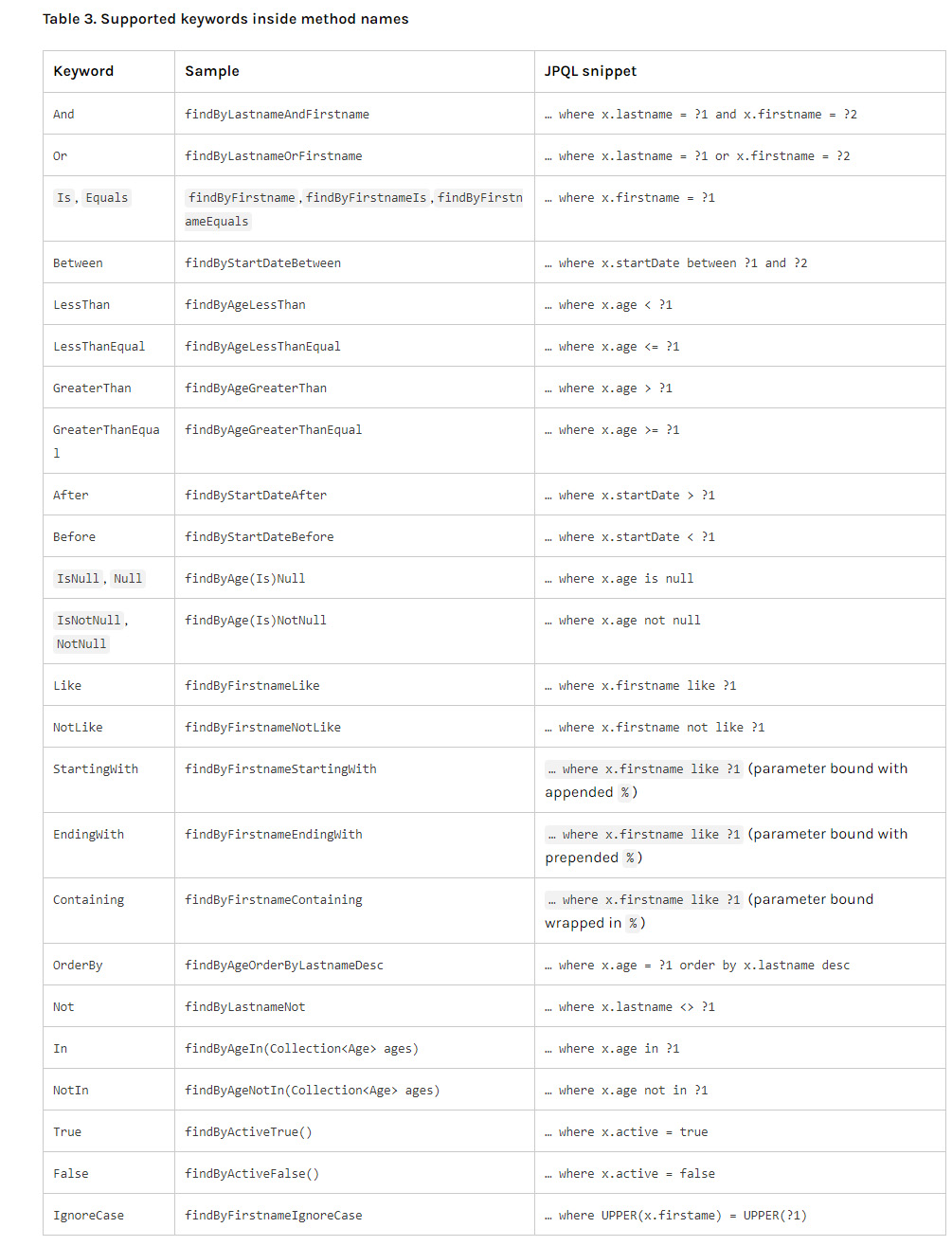
在Spring框架中,关于从数据表获取数据有不同的方法, 当数据查询比较简单时, 可以通过继承JpaRepository<T, L> 使用findBy***方法, 通过分析方法名来实现查询, T表示要查询的数据表所对应的实体, L表示该实体主键的类型, 比如Long; 关于findBy方法如何通过分析方法名来实现查询
如果查询的数据比较复杂, 查询条件比较复杂时, 可以考虑使用JPA的@query方法来实现查询;
1.首先Dao层需继承Repository<T, L>, T为实体名, L为该实体的主键类型;
2.写查询方法, 并使用@query进行注解, 例如:
@query(select u from User u where name=?1 and age=?2)
List findUser(String name,int age);
在这里, User为实体名, 参数中的name值在执行时可以赋值给?1的位置;
事实上, 如果只是从一个数据表中获取数据, 使用上面所说的findBy**方法即可, 并不需要使用@query来实现;
但是, 当查询条件比较复杂, 无法使用findBy方法时, 就可以考虑使用@query.先给出一个例子:
count 查询
@Query("select max(jobinfo.processes) from Jobinfo jobinfo,Taskinfo taskinfo where taskinfo.jobid=jobinfo.id and (shenweistatus=4 or shenweistatus=5) and queuename=?1")
List findMaxNuclear(String queuename);
通过这条语句, 可以看到其涉及到两个实体, 查询的是max, 用Findby是无法实现的, 但是这个例子就可以很好的实现; 而关于1中的T就没有多大意义, 应该是随便写语句中涉及到的一个实体即可;
关于其他的复杂查询都可以通过这种方法实现;
join & 模糊查询
@Query("select jobinfo.queuename from Jobinfo jobinfo,Taskinfo taskinfo where taskinfo.jobid=jobinfo.id and (shenweistatus=1 or shenweistatus=3) and jobinfo.queuename like ?1 group by jobinfo.queuename")
List findQueuenameByName(String name);
里边涉及到了模糊查询, 在SQL中, 模糊查询应该是 like ‘%AA%’等形式的, 但是这里的注解中如果加入了%, 会报错, 怎么解决呢?可以在调用该方法是人为的将%传进去, 比如findQueuenameByName(”%“+name+”%”),这样就可以实现模糊查询;
需要注意的是, 我测试发现, 这种方法只能查询一个字段, 如果要查询多个字段, 只能写多个方法, 得到多个list,最后将查询结果拼到一块;
Example 查询API
Support for query by example (QBE). An Example takes a probe to define the example. Matching options and type safety can be tuned using ExampleMatcher. ExampleMatcher API
字符串匹配
User user = new User();
user.setUsername("nn");

ExampleMatcher matching = ExampleMatcher.matching()
	 //模糊匹配开头的字符串
	.withMatcher("username", ExampleMatcher.GenericPropertyMatcher::startsWith)
	//模糊匹配开头的字符串
	//.withMatcher("username", ExampleMatcher.GenericPropertyMatcher.of(ExampleMatcher.StringMatcher.STARTING))
	//模糊匹配结尾的字符串
	.withMatcher("userId",ExampleMatcher.GenericPropertyMatcher::endsWith)
	//精确匹配
	.withMatcher("userId",ExampleMatcher.GenericPropertyMatcher::exact)

//忽略 password 字段
.withIgnorePaths("password");


Example<User> example = Example.of(user, matching);
userRepository.findAll(example);
Repository 内建方法的命名/规范