插件
概述
协议包和插件的区别
相同点: 都可以为平台提供动态的外挂程序能力
不同点: 协议包专注于提供设备数据编解码,且只服务于设备接入网关功能。 插件可通过SDK、HTTP、WebSocket等方式采集第三方平台数据。提供给设备接入网关或其他需要数据源的功能。插件中编写了大量为采集数据而存在的接口,如适配集群的定时任务等。
它是同’网关组件’绑定的, 每创建一个 插件网关组件, 就启动一个实例; (使用上可能接近与’网络组件’)
关键对象
老几样
org.jetlinks.plugin.core.Plugin // 插件实例接口 (最底层的)
org.jetlinks.pro.plugin.impl.jar.PluginDriverInstallerProvider //插件启动安装器提供商,用于支持不同的插件类型,如: jar等;
org.jetlinks.pro.plugin.impl.PluginDriverManager //插件管理对象, 管理所有插件 //org.jetlinks.pro.plugin.impl.DefaultPluginDriverManager 负责管理所有插件的对象
自定义插件
org.jetlinks.plugin.internal.device.DeviceGatewayPlugin //自定义插件开发: 网关类型的插件封装, 继承自它来开发网关插件逻辑
org.jetlinks.plugin.internal.device.DeviceGatewayPluginDriver //自定义插件开发: 提供插件配置/描述, 和创建
数据存储
- 每一个插件组件(
PluginDriver) 对应有一个组件提供器对应 (PluginDriverInstallerProvider) - 最终统一由
PluginDriverManager管理; 默认实现是org.jetlinks.pro.plugin.impl.DefaultPluginDriverManager - 插件数据存储在
s_plugin_driver表; 因为一个插件可以有多个实例, 是一对多的关系, 还有一张是ID映射表s_plugin_id_mapping; 管理接口是: /plugin/driver
加载流程
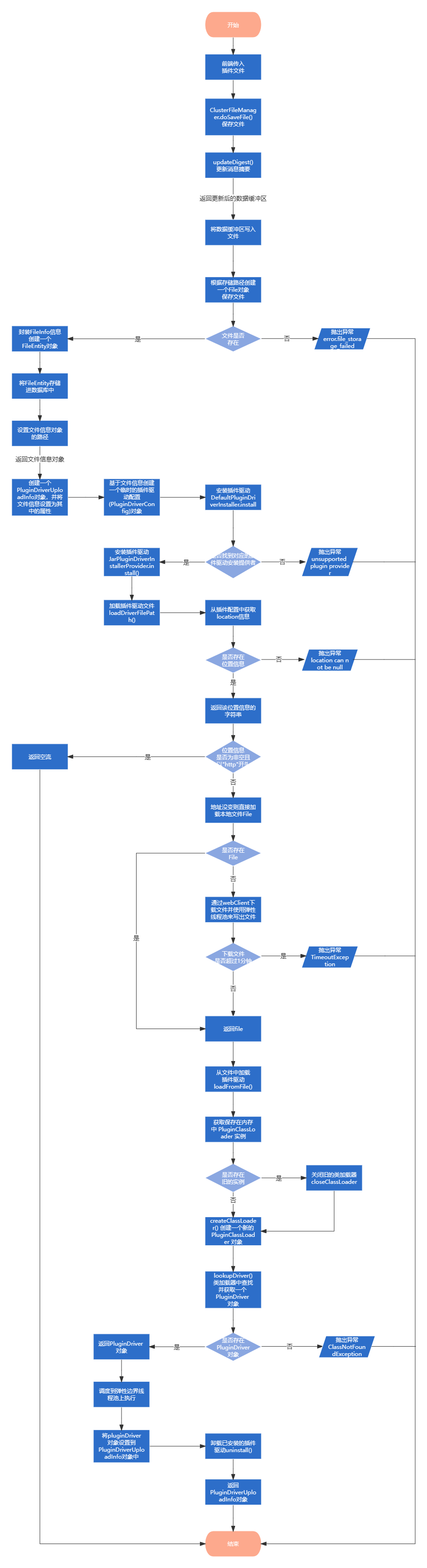 在平台插件管理新增插件时,通过jar包的方式加载驱动,使用 ServiceLoader 来加载插件驱动,通过配置 PluginDriver 指定插件驱动实现类,如果未配置,则将扫描整个jar包中的 PluginDriver 的实现类并初始化。
插件运行时同步
本地增删改的同步
org.jetlinks.pro.plugin.impl.DefaultPluginDriverManager: 继承的 org.jetlinks.pro.commons.ClusterEntityEventHandler有:
@EventListener
public final void handleEvent(EntityCreatedEvent<E> event)
@EventListener
public final void handleEvent(EntitySavedEvent<E> event)
@EventListener
public final void handleEvent(EntityDeletedEvent<E> event)
@EventListener
public final void handleEvent(EntityModifyEvent<E> event)
这些方法使用 Spring EventListener 体系, 监听本地的, Entity*Event 事件;
再最后调用到 org.jetlinks.pro.plugin.impl.DefaultPluginDriverManager::loadDriver流程.
集群的其他节点插件的同步
org.jetlinks.pro.plugin.impl.DefaultPluginDriverManager: 继承的 org.jetlinks.pro.commons.ClusterEntityEventHandler 订阅了集群 PluginDriverEntity 实体的增删改;
protected ClusterEntityEventHandler(EventBus eventBus, Class<E> type) {
        this.eventBus = eventBus;
        this.type = type;

        this.eventBus
            .subscribe(Subscription
                           .builder()
                           .subscriberId(StringUtils.hasText(this.getClass().getSimpleName()) ?
                                             this.getClass().getSimpleName() :
                                             this.getClass().getName())
                           //只订阅集群其他节点的数据,因为本地已经直接处理过了
                           .broker()
                           .topics(createTopic("*"))
                           .build(),
                       payload -> Mono
                           .defer(() -> {
                               String operation = payload.getTopicVars(createTopic("{operation}")).get("operation");
                               switch (operation) {
                                   case OPERATION_CREATED:
                                       return doHandleCreated(decode(payload), true);
                                   case OPERATION_SAVED:
                                       return doHandleSaved(decode(payload), true);
                                   case OPERATION_DELETED:
                                       return doHandleDeleted(decode(payload), true);
                                   case OPERATION_MODIFIED:
                                       ModifyEvent<E> event = decode(payload);
                                       return doHandleModified(event.before, event.after, true);
                               }
                               return Mono.empty();
                           })
                           .as(MonoTracer.create(payload.getTopic()))
            );
    }
然后同步, (注意: 其他节点的插件才会在这里同步 ().broker() //只订阅集群其他节点的数据)
最后调用到 org.jetlinks.pro.plugin.impl.DefaultPluginDriverManager::loadDriver
本地启动时初始化插件的同步
org.jetlinks.pro.plugin.impl.DefaultPluginDriverManager: 实现了 org.springframework.boot.CommandLineRunner, 在容器启动是 调用org.jetlinks.pro.plugin.PluginDriverInstaller::install初始化所有插件;
最后调用到 org.jetlinks.pro.plugin.impl.DefaultPluginDriverManager::loadDriver
DeviceGatewayPlugin 插件类 可以做什么?
主要逻辑在 org.jetlinks.plugin.internal.device.DeviceGatewayPlugin 和 org.jetlinks.plugin.core.AbstractPlugin
org.jetlinks.pro.plugin.device.PluginDeviceGateway 看源码, 差不多就是网关实现的翻版, 基本就是装饰了一下..
所有方法行为
可以参考 org.jetlinks.plugin.internal.device.DeviceGatewayPlugin 的注释说明
public abstract class DeviceGatewayPlugin extends AbstractPlugin {
    private final PluginDeviceGatewayService gatewayService;
    private final PluginDeviceManager deviceManager;
    protected final DeviceRegistry registry;

    public DeviceGatewayPlugin(String id, PluginContext context) {
        super(id, context);
        // 插件的一些平台对象
        gatewayService = context
                .services()
                .getServiceNow(PluginDeviceGatewayService.class);

        registry = context
                .services()
                .getServiceNow(DeviceRegistry.class);

        deviceManager = context
                .services()
                .getServiceNow(PluginDeviceManager.class);

    }
    ////////////////////////////////////////////////提供给插件///////////////////////////////////////////////////////////
    /**
     * <!> **设备上报消息时调用, 将消息传递给平台**
     * 处理解析后的设备消息,用于将第三方系统或者sdk的消息转为平台统一消息格式后,将消息传递给平台.
     * 请使用平台内置的消息实现,请勿自己实现{@link DeviceMessage}接口.
     */
    protected final Mono<Void> handleMessage(DeviceMessage message) {
        return gatewayService.handleMessage(this, message);
    }
    /**
     * 获取平台中的设备列表  **获取绑定该网关插件的所有设备**
     */
    protected final Flux<DeviceOperator> getPlatformDevices() {
        return deviceManager.getDevices(this);
    }

    /**
     * 获取平台中指定产品ID(插件中定义的产品ID)的设备列表 **根据产品获取所有设备列表**
     */
    protected final Flux<DeviceOperator> getPlatformDevices(String productId) {
        return deviceManager.getDevices(this, productId);
    }

    /////////////////////////////////////////////回调//////////////////////////////////////////////////////////////
    public Publisher<? extends DeviceMessage> execute(DeviceMessage message) {
        return Flux.empty();
    }
    /**
     * 执行物模型指令,并返回执行结果. **调用设备指令时调用**
     */
    public Publisher<? extends DeviceMessage> execute(String productId,
                                                      DeviceOperator device,
                                                      DeviceMessage message) {
        return execute(message);
    }


    /**
     * 获取产品配置的元数据信息,在产品详情界面会根据此信息来展示拓展信息输入框.  **产品的配置元数据**
     */
    public Mono<ConfigMetadata> getProductConfigMetadata(String productId) {
        return Mono.empty();
    }

    /**
     * 获取设备配置的元数据信息,在设备详情界面会根据此信息来展示拓展信息输入框. **设备的配置元数据**
     */
    public Mono<ConfigMetadata> getDeviceConfigMetadata(String productId) {
        return Mono.empty();
    }


    /**
     * 获取设备的状态,返回empty表示不支持获取. **获取设备 在线/离线状态**
     */
    public Mono<Byte> getDeviceState(DeviceOperator device) {
        return Mono.empty();
    }

    /**
     * 扫描某个产品下的设备 **获取某个产品下的所有设备**
     */
    @Deprecated
    public Flux<Device> scanDevices(String productId) {
        return Flux.empty();
    }


    /**
     * 当平台的设备注册(保存)时调用  **设备注册后调用**
     */
    public Mono<Void> doOnDeviceRegister(DeviceOperator device) {
        return Mono.empty();
    }

    /**
     * 当平台的产品注册(保存)时调用 **产品注册后调用**
     */
    public Mono<Void> doOnProductRegister(DeviceProductOperator product) {
        return Mono.empty();
    }

    //**插件类型, 目前只有一个**
    @Override
    public final PluginType getType() {
        return InternalPluginType.deviceGateway;
    }
}
实例 在网关启动时..
该加载行为适用于定时执行动作,如检测HTTP设备状态、定时获取设备数据等。
@Slf4j
class HttpApiDevicePlugin extends DeviceGatewayPlugin {
	@Override
    protected Mono<Void> doStart() {

        //启动时定时拉取状态
        this.context()
            .scheduler()
            .interval("pull_device_state",
                      Mono.defer(this::pollState),
                      Duration.ofSeconds(10));

        return super.doStart();
    }

    private Mono<Void> pollState() {
        return getPlatformDevices()
                .map(Thing::getId)
                .buffer(100)
                .flatMap(list -> this
                        .getDeviceState(list)
                        .flatMap(this::handleState)
                        .onErrorResume(err -> {
                            log.warn("check device state error", err);
                            return Mono.empty();
                        }))
                .then();
    }
}
实例 在调用设备功能 执行..
页面调用读取、写入、设备指令时。
@Slf4j
class HttpApiDevicePlugin extends DeviceGatewayPlugin {
	@Override
    public Publisher<? extends DeviceMessage> execute(DeviceMessage message) {

        // 读取属性
        if (message instanceof ReadPropertyMessage) {
            return registry
                    .getDevice(message.getDeviceId())
                    .flatMap(this::getDeviceInfo)
                    .map(DeviceInfo::getProperties)
                    .map(((ReadPropertyMessage) message).newReply()::success);
        }
        //修改属性
        else if (message instanceof WritePropertyMessage) {
            Map<String, Object> props = ((WritePropertyMessage) message).getProperties();
            Map<String, Object> props = ((WritePropertyMessage) message).getProperties();
            //WebClient进行POST请求
            return client
                    .post()
                    //URI路径
                    .uri("/device/{deviceId}/properties", message.getDeviceId())
                    //请求体
                    .bodyValue(props)
                    //发送请求并获取响应
                    .retrieve()
                    //将响应转换为Void类型
            		//实际应用场景中应将响应结果转换成一个具体的Object类型
                    //同时处理这个返回类型的对象并封装DeviceMessage
                    .bodyToMono(Void.class)
                    //返回一个成功的回复
                    .thenReturn(((WritePropertyMessage) message).newReply().success(props))
                    //出现错误,则返回带有错误信息的回复
                    .onErrorResume(err -> Mono.just(((WritePropertyMessage) message)
                                                            .newReply()
                                                            .error(err)));
            // 调用功能
        } else if (message instanceof FunctionInvokeMessage) {
            FunctionInvokeMessage functionInvokeMessage = ((FunctionInvokeMessage) message);
            return this
                    .invokeFunction(functionInvokeMessage)
                    .map(result -> functionInvokeMessage.newReply().success(result));
        }

        return super.execute(message);
    }
}
实例 插件上传并被加载后时..执行..
该加载行为适用于需要执行一次初始化数据的操作,如创建插件产品后自动获取第三方设备数据。
@Slf4j
class HttpApiDevicePlugin extends DeviceGatewayPlugin {

     public HttpApiDevicePlugin(String id, PluginContext context) {
         ...
         registerHandler(QueryDevicePageCommand.class,
                        CommandHandler
                                .of(QueryDevicePageCommand.metadata(
                                            SimplePropertyMetadata.of("id", "ID", StringType.GLOBAL)),
                                    (cmd, self) -> queryDevice(cmd),
                                    QueryDevicePageCommand::new)
         ...
        );
     }
}
自定义插件实现
org.jetlinks.plugin.internal.device.DeviceGatewayPluginDriver 用于注册,创建插件 (类似自定义协议的 ProtocolSupport)
org.jetlinks.plugin.internal.device.DeviceGatewayPlugin 实现插件逻辑主接口 (网关类型)
依赖 pom.xml
<!-- jetlinks  parent (基本配置)-->
<parent>
	<groupId>org.jetlinks.plugin</groupId>
	<artifactId>jetlinks-plugin</artifactId>
	<version>1.0.0-SNAPSHOT</version>
</parent>

<!-- jetlinks plugin 相关api; 注意: cn.hutool 是通用依赖(或者说jetlinks-standalone要引入)-->
<dependencies>
	<dependency> <groupId>cn.hutool</groupId> <artifactId>hutool-http</artifactId> <version>5.8.4</version> </dependency>
	<dependency>
		<groupId>org.jetlinks.plugin</groupId>
		<artifactId>plugin-internal</artifactId>
		<version>1.0.0-SNAPSHOT</version>
	</dependency>
</dependencies>
实现插件逻辑 DeviceGatewayPlugin
public class HttpActiveDevicePlugin extends DeviceGatewayPlugin {
    private static final Logger log = LoggerFactory.getLogger(HttpActiveDevicePlugin.class);

    static final String KEY_BASE_API_URL = "base_api";
    static final String KEY_TEST = "test";

    public final String BASE_API;
    public HttpActiveDevicePlugin(String id, PluginContext context) {
        super(id, context);
        //插件的配置 ....
        BASE_API  = context
                .environment()
                .getProperty(KEY_BASE_API_URL)
                .orElseThrow(() -> new IllegalArgumentException("plugin env 'base_api' is required"));

        log.warn(" api 地址是 : {}", KEY_BASE_API_URL);

    }

    @Override
    protected Mono<Void> doStart() {
        //插件启动时,  定时拉取状态; //这里是开一个 scheduler
        this.context()
                .scheduler()
                .interval("HttpActiveDevicePlugin_pollState",
                        Mono.defer(this::pollDeviceState),
                        Duration.ofSeconds(10));

        return super.doStart();
    }
    private Mono<Void> pollDeviceState() {
        return getPlatformDevices()//拿到插件绑定 的所有设备ID
                .map(DeviceOperator::getDeviceId)
                .buffer(100)
                .flatMap(list -> this
                        .getDeviceState(list)//去第三方获取数据
                        .flatMap(this::handleState)//处理数据
                        .onErrorResume(err -> {
                            log.warn("check device state error", err);
                            return Mono.empty();
                        }))
                .then();
    }
    private Flux<JsonNode> getDeviceState(List<String> device) {
        // 这里 HTTP 或 RPC, 总之 去第三方拿
        return Flux.empty();
    }
    private Mono<Void>  handleState(JsonNode message) {
        //伪代码, 根据拿到的数据 判断
        if (deviceInfo.online) {
            //属性上报 消息
            ReportPropertyMessage msg = new ReportPropertyMessage();
            msg.setDeviceId(deviceInfo.id);
            msg.setProperties(deviceInfo.getProperties());

            return handleMessage(message);//提交给平台处理
        } else {
            //离线消息
            DeviceOfflineMessage msg = new DeviceOfflineMessage();
            msg.setDeviceId(deviceInfo.id);
            return handleMessage(message);//提交给平台处理
        }
    }

}
给定描述和创建对象 DeviceGatewayPluginDriver
public class HttpActiveDevicePluginDriver implements DeviceGatewayPluginDriver {

    private static final Logger log = LoggerFactory.getLogger(HttpActiveDevicePluginDriver.class);
    static Version version_1_0 = new Version(1, 0, 0, true);
    public static final ConfigKey<Boolean> required = ConfigKey.of("required", "是否必填", Boolean.TYPE);

    @Nonnull
    @Override
    public Mono<? extends DeviceGatewayPlugin> createPlugin(@Nonnull String pluginId, @Nonnull PluginContext context) {
        //创建
        return Mono.just(new HttpActiveDevicePlugin(pluginId, context));
    }

    @Nonnull
    @Override
    public Description getDescription() {
        // 插件 的配置/描述
        return Description.of(
                "mock-http-api",
                "模拟HTTP-API接入",
                "",
                version_1_0,
                VersionRange.of(Version.platform_2_0, Version.platform_latest),
                //告诉平台,此插件需要的配置信息
                Collections.singletonMap(
                        PLUGIN_CONFIG_METADATA,
                        new DefaultConfigMetadata()
                            .add(HttpActiveDevicePlugin.KEY_BASE_API_URL, "API地址", new StringType().expand(required.value(true)))
                            .add(HttpActiveDevicePlugin.KEY_TEST, "测试测试", new StringType().expand(required.value(true)))
                )
        );
    }
}
设备ID映射
需要在插件中, 实现查询方法, 方可在UI中找到映射
public class HttpActiveDevicePlugin extends DeviceGatewayPlugin implements CommandSupport {
    private static final Logger log = LoggerFactory.getLogger(HttpActiveDevicePlugin.class);
    @Override
    protected <R> R executeUndefinedCommand(@Nonnull Command<R> command) {
        if (command instanceof QueryDevicePageCommand){
            /**
             *  这里可以扩展 查外部数据, 比如数据库 等
             *  TODO 目前对接的不多 暂时这里写死
             *  id 格式是 {eui}_{type}
             */
            List<Device> devices = new ArrayList<>();
            Device device = new Device();
            device.setId("0078cc7371b2000007801415_gateway-soil");
            device.setProductId("");
            device.setName("土壤墒情01");
            devices.add(device);

            device = new Device();
            device.setId("00781d3b6c70000007c01413_weather");
            device.setProductId("");
            device.setName("晓万象Q1叶子气象站");
            devices.add(device);

            device = new Device();
            device.setId("n50902054_insecticidal-lamp");
            device.setProductId("");
            device.setName("杀虫灯01");
            devices.add(device);

            PagerResult<Device> result = PagerResult.of(2, devices) ;
            return (R) result;
        }
        throw new CommandException(this, command, "error.unsupported_execute_command", null, CommandUtils.getCommandIdByType(command.getClass()));
    }
    ...............
}
配置化协议解析
二进制
| 字段 | 说明 | 示例 |
|---|---|---|
name | 字段名 | temperature |
type | 数据类型 | uint8/int16/float32/string/bit |
offset | 字节偏移(从 0 开始) | 0 |
length | 字节长度 | 1/2/4 |
endian | 字节序 | little(小端)/big(大端) |
desc | 字段描述 | 温度值 |
unit | 单位 | ℃ |
scale | 缩放系数 | 0.1(原值 ×0.1 = 真实值) |
位域
| 子字段名 | 说明 |
|---|---|
bits | 位域子项数组,定义每个 bit / 位段的解析规则 |
name | 子位段名称 |
pos | 起始 bit 位置(从 0 开始,最低位 = 0,最高位 = 7) |
len | 占用 bit 长度(默认 = 1,可省略) |
desc | 子位段描述 |
位域 = 把 1 个字节(8 bit)拆分成多个独立的 bit 位 / 连续位段进行解析
- 最小解析单位:bit(比特)
- 适用场景:设备状态、开关量、报警标志、模式、档位等用少量 bit 表示的数据
- 固定占用:1 字节(8 bit),不支持跨字节解析(跨字节需拆成多个位域字段)
示例配置
{
  "protocol_name": "温湿度传感器协议",
  "total_length": 8,    // 整包长度
  "fields": [
    {
      "name": "header",
      "type": "uint8",
      "offset": 0,
      "length": 1,
      "endian": "big",
      "desc": "帧头",
      "fixed_value": 0xAA  // 固定值校验
    },
    {
      "name": "temperature",
      "type": "int16",
      "offset": 1,
      "length": 2,
      "endian": "big",
      "desc": "温度",
      "unit": "℃",
      "scale": 0.1
    },
    {
      "name": "humidity",
      "type": "uint16",
      "offset": 3,
      "length": 2,
      "endian": "big",
      "desc": "湿度",
      "unit": "%RH",
      "scale": 0.1
    },
    {
      "name": "status",
      "type": "bit",       // 位域解析
      "offset": 5,
      "length": 1,
      "bits": [
        {"name": "power_alarm", "pos": 0, "desc": "电源报警"},
        {"name": "sensor_error", "pos": 1, "desc": "传感器故障"},
        {"name": "signal_strength", "pos": 2, "len": 2, "desc": "信号强度(2位)"}
      ]
    },
    {
      "name": "checksum",
      "type": "uint8",
      "offset": 6,
      "length": 1,
      "desc": "校验和"
    },
    {
      "name": "tail",
      "type": "uint8",
      "offset": 7,
      "length": 1,
      "fixed_value": 0x55,
      "desc": "帧尾"
    }
  ]
}