QT with FFmpeg
FFmpeg是一套可以用来记录, 转换数字音频, 视频, 并能将其转化为流的开源计算机程序; 采用LGPL或GPL许可证; 它提供了录制, 转换以及流化音视频的完整解决方案; 它包含了非常先进的音频/视频编解码库libavcodec, 为了保证高可移植性和编解码质量, libavcodec里很多code都是从头开发的;
下载&添加依赖
一定要选择版本! 下载页默认是开发版…
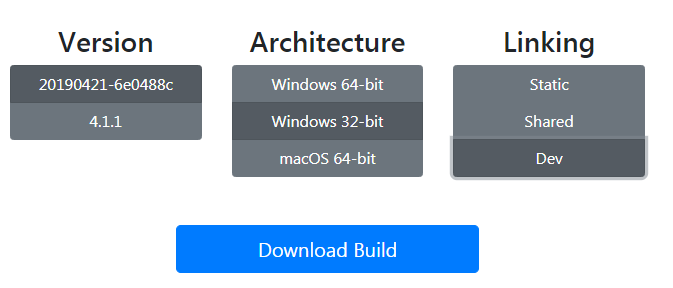
- 下载的是开发版的 FFmpeg 和share 库, 例:
ffmpeg-4.1-win32-dev.zip和ffmpeg-4.1.1-win32-shared.zip
解压的QT项目根目录./ffmpeg-4.1.1-win32-dev/ 修改qt pro 文件
INCLUDEPATH += $$PWD/ffmpeg-4.1.1-win32-dev/include
LIBS += $$PWD/ffmpeg-4.1.1-win32-dev/lib/avformat.lib   \
        $$PWD/ffmpeg-4.1.1-win32-dev/lib/avcodec.lib    \
        $$PWD/ffmpeg-4.1.1-win32-dev/lib/avdevice.lib   \
        $$PWD/ffmpeg-4.1.1-win32-dev/lib/avfilter.lib   \
        $$PWD/ffmpeg-4.1.1-win32-dev/lib/avutil.lib     \
        $$PWD/ffmpeg-4.1.1-win32-dev/lib/postproc.lib   \
        $$PWD/ffmpeg-4.1.1-win32-dev/lib/swresample.lib \
        $$PWD/ffmpeg-4.1.1-win32-dev/lib/swscale.lib

# 或者简写
INCLUDEPATH += $$PWD/ffmpeg-4.1.1-win32-dev/include
LIBS += -L $$PWD/ffmpeg-4.1.1-win32-dev/lib/ -lavformat -lavcodec -lavdevice -lavfilter -lavutil -lpostproc -lswresample -lswscale
测试代码
#include <stdio.h>

// 包含ffmpeg头文件
extern "C"
{
    #include <libavcodec/avcodec.h>
    #include <libavdevice/avdevice.h>
    #include <libavformat/avformat.h>
    #include <libavfilter/avfilter.h>
    #include <libavutil/avutil.h>
    #include <libswscale/swscale.h>
    #include <libavutil/log.h>
}

int main()
{
    printf("Hello FFMPEG, av_version_info is %s\n",
              av_version_info());

    printf("avutil_configuration is \n%s\n",
          avutil_configuration());


    printf("Hello World!\n");
    return 0;
}
ffmpeg-4.1.1-win32-shared.zip
同时要把对应的dll文件加入到对应工程的debug和release目录中,dll运行时需要
静态库中的lib: 该LIB包含函数代码本身(即包括函数的索引, 也包括实现), 在编译时直接将代码加入程序当中
动态库中的lib: 该LIB包含了函数所在的DLL文件和文件中函数位置的信息(索引), 函数实现代码由运行时加载在进程空间中的DLL提供
总之, lib是编译时用到的, dll是运行时用到的; 如果要完成源代码的编译, 只需要lib; 如果要使动态链接的程序运行起来, 只需要dll;
Hello FFMPEG, av_version_info is 4.1.1
avutil_configuration is
--disable-static --enable-shared --enable-gpl --enable-version3 --enable-sdl2 --enable-fontconfig --enable-gnutls --enable-iconv --enable-libass --ena
ble-libbluray --enable-libfreetype --enable-libmp3lame --enable-libopencore-amrnb --enable-libopencore-amrwb --enable-libopenjpeg --enable-libopus --e
nable-libshine --enable-libsnappy --enable-libsoxr --enable-libtheora --enable-libtwolame --enable-libvpx --enable-libwavpack --enable-libwebp --enabl
e-libx264 --enable-libx265 --enable-libxml2 --enable-libzimg --enable-lzma --enable-zlib --enable-gmp --enable-libvidstab --enable-libvorbis --enable-
libvo-amrwbenc --enable-libmysofa --enable-libspeex --enable-libxvid --enable-libaom --enable-libmfx --enable-amf --enable-ffnvcodec --enable-cuvid --
enable-d3d11va --enable-nvenc --enable-nvdec --enable-dxva2 --enable-avisynth
Hello World!
实例项目文件
non QT - plain c application 项目
C与C++ 混编的问题
以上项目, 如果转为QT项目会出错, 大概是QT会以C++的方式编译 FFmpeg 库; 而FFmpeg是纯C语言写的, 所以会出错.undefined reference to...
解决方案是, 以C的方式导入头文件.
官方wiki页面也有说明 FFmpeg is written in C99, thus some features may not be compilable or usable in C++.
Anyway, for most purposes, including FFmpeg headers in a C++ application should be rather straightforward.
First, to include the FFmpeg headers within your C++ application you need to explicitly state that you are including C code. You can do this by encompassing your FFmpeg includes using extern “C”, like in:
extern "C" {
#include <libavutil/imgutils.h>
#include <libavcodec/avcodec.h>
#include <libswscale/swscale.h>
}
Including FFmpeg headers in a C++ application
#include "mainwindow.h"
#include <QApplication>
#include <QPushButton>
#include <QDebug>

// ffmpeg头文件
extern "C"
{
    #include <libavcodec/avcodec.h>
    #include <libavdevice/avdevice.h>
    #include <libavformat/avformat.h>
    #include <libavfilter/avfilter.h>
    #include <libavutil/avutil.h>
    #include <libswscale/swscale.h>
    #include <libavutil/log.h>
}
int main(int argc, char *argv[])
{

    qDebug()<<"Hello FFMPEG, av_version_info is---- "<<av_version_info();

    QApplication a(argc, argv);
    MainWindow w;
    QPushButton but(&w);
    but.setText("hhh");
    but.setVisible(false);
    w.show();
    return a.exec();
}