Spring AI
https://docs.spring.io/spring-ai/reference/index.html
The Spring AI project aims to streamline the development of applications that incorporate artificial intelligence functionality without unnecessary complexity.
The project draws inspiration from notable Python projects, such as LangChain and LlamaIndex, but Spring AI is not a direct port of those projects. The project was founded with the belief that the next wave of Generative AI applications will not be only for Python developers but will be ubiquitous across many programming languages.
Spring AI 项目从 LangChain 和 LlamaIndex 等著名 Python 项目中汲取灵感,但 Spring AI 并不是这些项目的直接移植。项目成立的信念是,下一波生成式人工智能应用将不仅仅是 Python 开发人员的专利,它将在多种编程语言中无处不在。
At its core, Spring AI addresses the fundamental challenge of AI integration: Connecting your enterprise Data and APIs with the AI Models.
关键概念
https://docs.spring.io/spring-ai/reference/concepts.html
Models
AI models are algorithms designed to process and generate information, often mimicking human cognitive functions. By learning patterns and insights from large datasets, these models can make predictions, text, images, or other outputs, enhancing various applications across industries.
There are many different types of AI models, each suited for a specific use case. While ChatGPT and its generative AI capabilities have captivated users through text input and output, many models and companies offer diverse inputs and outputs. Before ChatGPT, many people were fascinated by text-to-image generation models such as Midjourney and Stable Diffusion.
The following table categorizes several models based on their input and output types:
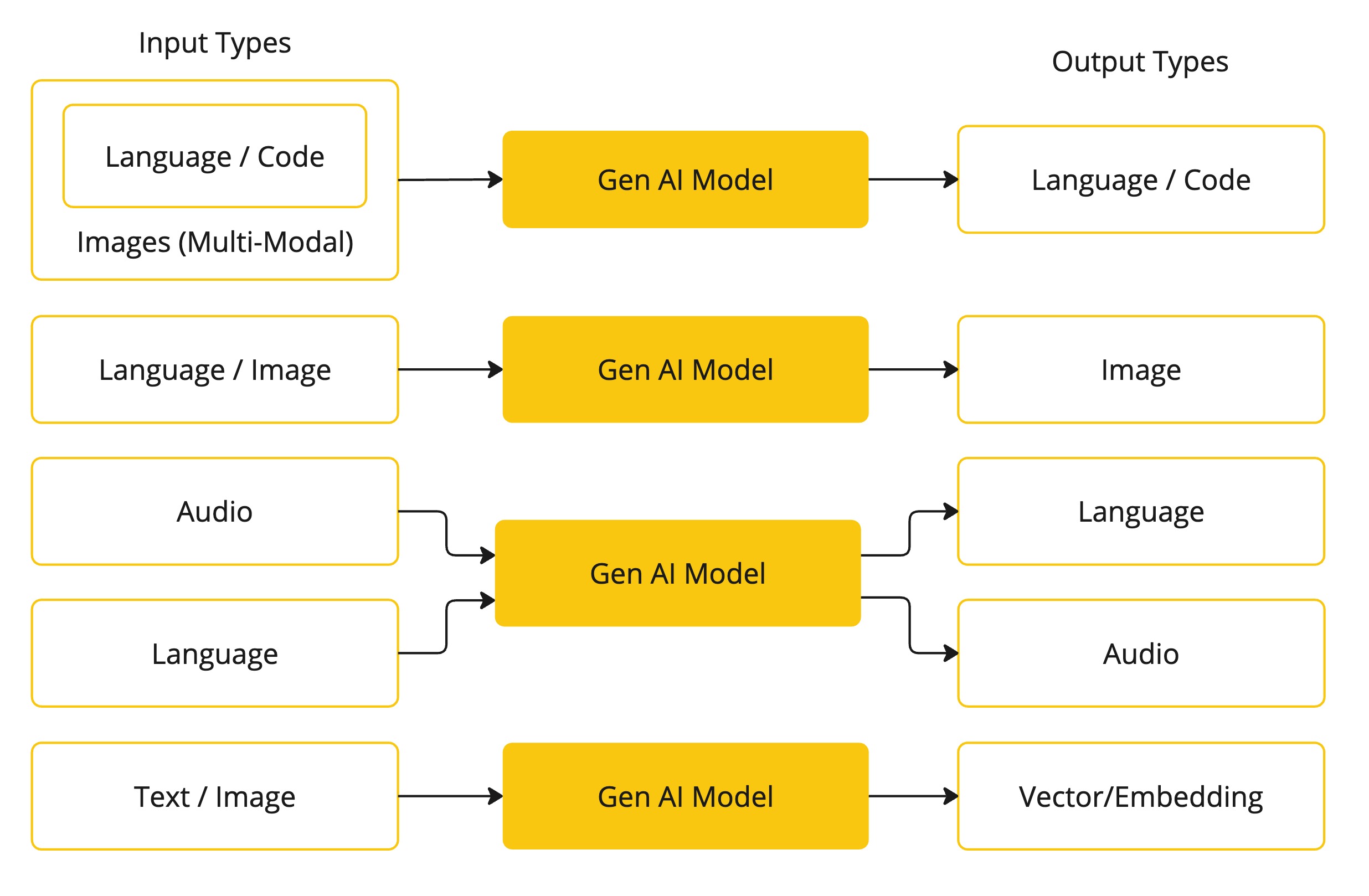
Spring AI currently supports models that process input and output as language, image, and audio. The last row in the previous table, which accepts text as input and outputs numbers, is more commonly known as embedding text and represents the internal data structures used in an AI model. Spring AI has support for embeddings to support more advanced use cases.
What sets models like GPT apart is their pre-trained nature, as indicated by the “P” in GPT—Chat Generative Pre-trained Transformer. This pre-training feature transforms AI into a general developer tool that does not require an extensive machine learning or model training background.
Prompts
Prompts serve as the foundation for the language-based inputs that guide an AI model to produce specific outputs. For those familiar with ChatGPT, a prompt might seem like merely the text entered into a dialog box that is sent to the API. However, it encompasses much more than that. In many AI Models, the text for the prompt is not just a simple string.
ChatGPT’s API has multiple text inputs within a prompt, with each text input being assigned a role. For example, there is the system role, which tells the model how to behave and sets the context for the interaction. There is also the user role, which is typically the input from the user.
Crafting effective prompts is both an art and a science. ChatGPT was designed for human conversations. This is quite a departure from using something like SQL to “‘ask a question.‘” One must communicate with the AI model akin to conversing with another person.
Such is the importance of this interaction style that the term “Prompt Engineering” has emerged as its own discipline. There is a burgeoning collection of techniques that improve the effectiveness of prompts. Investing time in crafting a prompt can drastically improve the resulting output.
Embeddings
Embeddings are numerical representations of text, images, or videos that capture relationships between inputs.
Embeddings work by converting text, image, and video into arrays of floating point numbers, called vectors. These vectors are designed to capture the meaning of the text, images, and videos. The length of the embedding array is called the vector’s dimensionality.
By calculating the numerical distance between the vector representations of two pieces of text, an application can determine the similarity between the objects used to generate the embedding vectors.
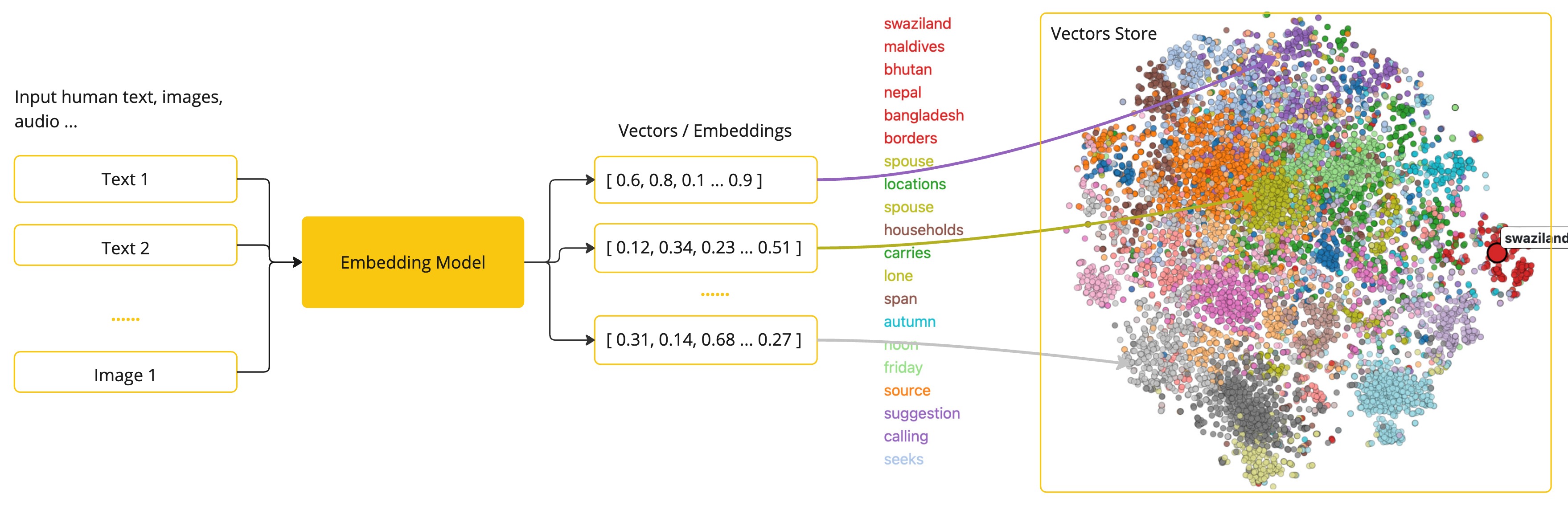
As a Java developer exploring AI, it’s not necessary to comprehend the intricate mathematical theories or the specific implementations behind these vector representations. A basic understanding of their role and function within AI systems suffices, particularly when you’re integrating AI functionalities into your applications.
Tokens
Tokens serve as the building blocks of how an AI model works. On input, models convert words to tokens. On output, they convert tokens back to words.
In English, one token roughly corresponds to 75% of a word. For reference, Shakespeare’s complete works, totaling around 900,000 words, translate to approximately 1.2 million tokens.
Structured Output
The output of AI models traditionally arrives as a java.lang.String, even if you ask for the reply to be in JSON. It may be a correct JSON, but it is not a JSON data structure. It is just a string. Also, asking “for JSON” as part of the prompt is not 100% accurate.
This intricacy has led to the emergence of a specialized field involving the creation of prompts to yield the intended output, followed by converting the resulting simple string into a usable data structure for application integration.
Function Calling
Large Language Models (LLMs) are frozen after training, leading to stale knowledge, and they are unable to access or modify external data.
The Function Calling mechanism addresses these shortcomings. It allows you to register your own functions to connect the large language models to the APIs of external systems. These systems can provide LLMs with real-time data and perform data processing actions on their behalf.
Spring AI greatly simplifies code you need to write to support function invocation. It handles the function invocation conversation for you. You can provide your function as a @Bean and then provide the bean name of the function in your prompt options to activate that function. Additionally, you can define and reference multiple functions in a single prompt.
大型语言模型(LLM)在训练后会被冻结,导致知识陈旧,而且无法访问或修改外部数据。
函数调用机制解决了这些缺陷。它允许你注册自己的函数,将大型语言模型连接到外部系统的应用程序接口。这些系统可以为 LLM 提供实时数据,并代表它们执行数据处理操作。
Spring AI 大大简化了为支持函数调用而编写的代码。它会为你处理函数调用对话。您可以将函数作为 @Bean 提供,然后在提示选项中提供函数的 bean 名称,以激活该函数。此外,您还可以在单个提示符中定义和引用多个函数。
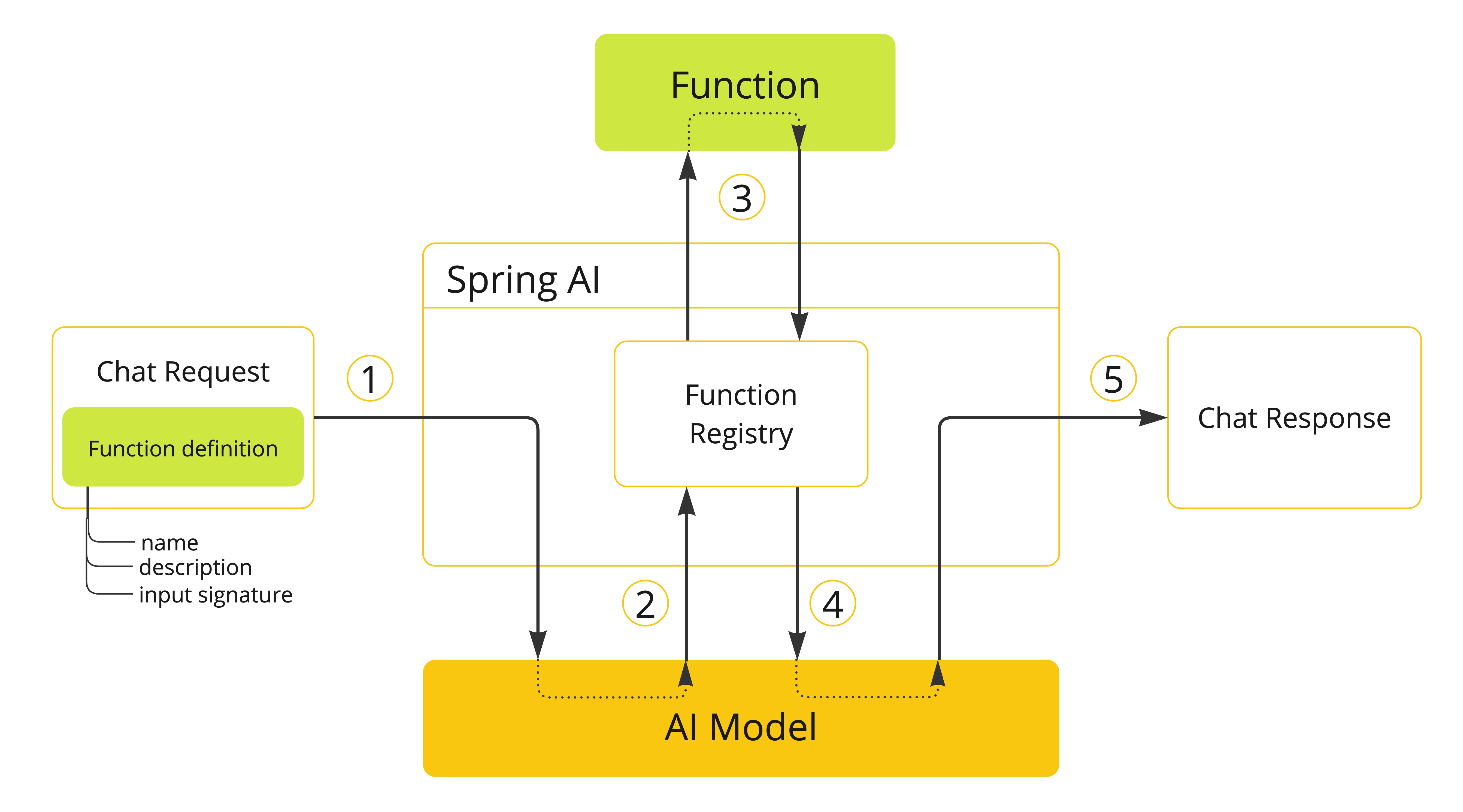
- (1) perform a chat request sending along function definition information. The later provides the
name,description(e.g. explaining when the Model should call the function), andinput parameters(e.g. the function’s input parameters schema). - (2) when the Model decides to call the function, it will call the function with the input parameters and return the output to the model.
- (3) Spring AI handles this conversation for you. It dispatches the function call to the appropriate function and returns the result to the model.
- (4) Model can perform multiple function calls to retrieve all the information it needs.
- (5) once all information needed is acquired, the Model will generate a response.
Follow the Function Calling documentation for further information on how to use this feature with different AI models.
生态组件
Chat Client API
Chat Model API
- Amazon Bedrock
- Anthropic 3
- Azure OpenAI
- Google VertexAI
- Groq
- Hugging Face
- Mistral AI
- MiniMax
- Moonshot AI
- Ollama
- OpenAI
- QianFan
- ZhiPu AI
- Watsonx.AI
Embeddings Model API
- Azure OpenAI
- Amazon Bedrock
- Azure OpenAI
- Mistral AI
- MiniMax
- Ollama
- (ONNX) Transformers
- OpenAI
- PostgresML
- QianFan
- VertexAI
- ZhiPu AI
Vector Databases
https://docs.spring.io/spring-ai/reference/api/vectordbs.html
A vector databases is a specialized type of database that plays an essential role in AI applications.
In vector databases, queries differ from traditional relational databases. Instead of exact matches, they perform similarity searches. When given a vector as a query, a vector database returns vectors that are “similar” to the query vector. Further details on how this similarity is calculated at a high-level is provided in a Vector Similarity.
Vector databases are used to integrate your data with AI models. The first step in their usage is to load your data into a vector database. Then, when a user query is to be sent to the AI model, a set of similar documents is first retrieved. These documents then serve as the context for the user’s question and are sent to the AI model, along with the user’s query. This technique is known as Retrieval Augmented Generation (RAG).
The following sections describe the Spring AI interface for using multiple vector database implementations and some high-level sample usage.
The last section is intended to demystify the underlying approach of similarity searching in vector databases.
Function Calling API
The integration of function support in AI models, permits the model to request the execution of client-side functions, thereby accessing necessary information or performing tasks dynamically as required.
MCP widt Spring AI
参考- https://docs.spring.io/spring-ai/reference/api/mcp/mcp-overview.html
参考 MCP服务端- https://docs.spring.io/spring-ai/reference/api/mcp/mcp-server-boot-starter-docs.html
spring initializr
spring initializr - https://start.spring.io/
plugins {
	java
	id("org.springframework.boot") version "3.5.0"
	id("io.spring.dependency-management") version "1.1.7"
}

group = "com.example"
version = "0.0.1-SNAPSHOT"

java {
	toolchain {
		languageVersion = JavaLanguageVersion.of(21)
	}
}

repositories {
	mavenCentral()
}

extra["springAiVersion"] = "1.0.0"

dependencies {
	implementation("org.springframework.boot:spring-boot-starter-web")
	implementation("org.springframework.ai:spring-ai-starter-mcp-server-webmvc")
	testImplementation("org.springframework.boot:spring-boot-starter-test")
	testRuntimeOnly("org.junit.platform:junit-platform-launcher")
}

dependencyManagement {
	imports {
		mavenBom("org.springframework.ai:spring-ai-bom:${property("springAiVersion")}")
	}
}

tasks.withType<Test> {
	useJUnitPlatform()
}
Transport Options
The MCP Server supports three transport mechanisms, each with its dedicated starter:
- Standard Input/Output (STDIO) -
spring-ai-starter-mcp-server - Spring MVC (Server-Sent Events) -
spring-ai-starter-mcp-server-webmvc - Spring WebFlux (Reactive SSE) -
spring-ai-starter-mcp-server-webflux
Features and Capabilities
The MCP Server Boot Starter allows servers to expose tools, resources, and prompts to clients. It automatically converts custom capability handlers registered as Spring beans to sync/async specifications based on server type:
Tools
https://docs.spring.io/spring-ai/reference/api/tools.html Allows servers to expose tools that can be invoked by language models. The MCP Server Boot Starter provides:
- Change notification support
- Spring AI Tools are automatically converted to sync/async specifications based on server type
- Automatic tool specification through Spring beans: in short 要提供MCP 工具要用ToolCallbackProvider 装饰一下, 注册给容器
@Bean
public ToolCallbackProvider myTools(...) {
    List<ToolCallback> tools = ...
    return ToolCallbackProvider.from(tools);
}
or using the low-level API:
@Bean
public List<McpServerFeatures.SyncToolSpecification> myTools(...) {
    List<McpServerFeatures.SyncToolSpecification> tools = ...
    return tools;
}
The auto-configuration will automatically detect and register all tool callbacks from: * Individual ToolCallback beans * Lists of ToolCallback beans * ToolCallbackProvider beans
Tools are de-duplicated by name, with the first occurrence of each tool name being used.
Tool Context Support
The ToolContext is supported, allowing contextual information to be passed to tool calls. It contains an McpSyncServerExchange instance under the exchange key, accessible via McpToolUtils.getMcpExchange(toolContext).
See this example demonstrating exchange.loggingNotification(…) and exchange.createMessage(…).
Provides a standardized way for servers to expose resources to clients.
- Static and dynamic resource specifications
- Optional change notifications
- Support for resource templates
- Automatic conversion between sync/async resource specifications
- Automatic resource specification through Spring beans:
@Bean
public List<McpServerFeatures.SyncResourceSpecification> myResources(...) {
    var systemInfoResource = new McpSchema.Resource(...);
    var resourceSpecification = new McpServerFeatures.SyncResourceSpecification(systemInfoResource, (exchange, request) -> {
        try {
            var systemInfo = Map.of(...);
            String jsonContent = new ObjectMapper().writeValueAsString(systemInfo);
            return new McpSchema.ReadResourceResult(
                    List.of(new McpSchema.TextResourceContents(request.uri(), "application/json", jsonContent)));
        }
        catch (Exception e) {
            throw new RuntimeException("Failed to generate system info", e);
        }
    });

    return List.of(resourceSpecification);
}
Model Context Protocol (MCP) - https://docs.spring.io/spring-ai/reference/api/mcp/mcp-overview.html
The Model Context Protocol (MCP) is a standardized protocol that enables AI models to interact with external tools and resources in a structured way. Think of it as a bridge between your AI models and the real world - allowing them to access databases, APIs, file systems, and other external services through a consistent interface. It supports multiple transport mechanisms to provide flexibility across different environments.
in short 简单来讲 MCP 大语言模型
Example Applications
- 参考示例 example
- Weather Server (WebFlux) - Spring AI MCP Server Boot Starter with WebFlux transport.
- Weather Server (STDIO) - Spring AI MCP Server Boot Starter with STDIO transport.
- Weather Server Manual Configuration - Spring AI MCP Server Boot Starter that doesn’t use auto-configuration but the Java SDK to configure the server manually.
SpringAI MCP 的实现类型
STDIO
| Server Type | Dependency | Property |
|---|---|---|
| Standard Input/Output (STDIO) | spring-ai-starter-mcp-server | spring.ai.mcp.server.stdio=true |
HTTP
| Server Type | Dependency | Property |
| SSE WebMVC | spring-ai-starter-mcp-server-webmvc | spring.ai.mcp.server.protocol=SSE or empty |
| Streamable-HTTP WebMVC | spring-ai-starter-mcp-server-webmvc | spring.ai.mcp.server.protocol=STREAMABLE |
| Stateless Streamable-HTTP WebMVC | spring-ai-starter-mcp-server-webmvc | spring.ai.mcp.server.protocol=STATELESS |
目前 spring mcp 支持spring的版本
开发框架对比
| 框架 | Spring Al | LangChain4j | Langchain |
|---|---|---|---|
| 版本 | 1.0.0-M7 | 1.0.0-beta3 | 0.3.56 |
| Github Star | 4.9K+ | 7.4K+(增速较快) | 107K+ |
| 官页 | https://docs.langchain4j.dev/ https://github.com/spring-projects/spring-ai | https://docs.langchain4j.dev/ https://github.com/langchain4j/langchain4j | https://python.langchain.com/docs/introduction/ https://github.com/langchain-ai/langchain |
| 开发语言 | Java | Java | Python |
| 环境需求 | JDK 17+、Spring Boot 3.x | JDK 17+ | Python 3 |
| 支持的模型 | Anthropic Claude、Azure OpenAI、DeepSeek (OpenAI-proxy)、Google VertexAI Gemini、Groq (OpenAI-proxy)、HuggingFace、Mistral AI、MiniMax、Moonshot AI、NVIDIA (OpenAI-proxy)、OCI GenAI/Cohere、Ollama、OpenAI、Perplexity (OpenAI-proxy)、QianFan、ZhiPu AI、Watsonx.AI、Amazon Bedrock Converse | Amazon Bedrock、Anthropic、Azure OpenAl、ChatGLM、DashScope (Qwen)、GitHub Models、Google AI Gemini、 Google Vertex Al Gemini. Google Vertex AI PaLM 2、 Hugging Face、Jlama、LocalAl、MistralAl、 Ollama、OpenAl、OpenAIl Official SDK、Qianfan、Cloudflare Workers Al、ZhiPuAl、Xinference | AI21 Labs、Aleph Alpha、Alibaba Cloud PAI EAS、Amazon API Gateway、Anyscale、Aphrodite Engine、Arcee、Azure ML、Azure OpenAI、Baichuan LLM、Baidu Qianfan、Banana、Baseten、Beam、Bedrock、Bittensor、CerebriumAI、ChatGLM、Clarifai、Cloudflare Workers AI、Cohere、C Transformers、CTranslate2、Databricks、DeepInfra、DeepSparse、Eden AI、ExLlamaV2、Fireworks、ForefrontAI、Friendli、GigaChat、Google AI、Google Cloud Vertex AI、GooseAI、GPT4All、Gradient、Huggingface Endpoints、Hugging Face Local Pipelines、IBM watsonx.ai、IPEX-LLM、Javelin AI Gateway Tutorial、JSONFormer、KoboldAI API、Konko、Layerup Security、Llama.cpp、Llamafile、LM Format Enforcer、Manifest、Minimax、MLX Local Pipelines、Modal、ModelScope、MoonshotChat、MosaicML、NLP Cloud、NVIDIA、oci_generative_ai、OCI Data Science Model Deployment Endpoint、OctoAI、Ollama、OpaquePrompts、OpenAI、OpenLLM、OpenLM、OpenVINO、Outlines、Petals、PipelineAI、Pipeshift、Predibase、PredictionGuard、PromptLayer OpenAI、RELLM、Replicate、Runhouse、RunPod LLM、SageMakerEndpoint、SambaNovaCloud、SambaStudio、Solar、SparkLLM、StochasticAI、Nebula (Symbl.ai)、TextGen、Titan Takeoff、Together AI、Tongyi Qwen、vLLM、Volc Engine Maas、Intel Weight-Only Quantization、Writer LLM、Xorbits Inference (Xinference)、YandexGPT、Yi、Yuan2.0 |
| Chat Memory | 支持 (基本功能不可能不支持) https://docs.spring.io/spring-ai/reference/api/chat-memory.html | 支持 https://docs.langchain4j.dev/tutorials/chat-memory | 支持 |
| RAG 支持 | Naive RAG Advanced RAG (ETL Pipeline) RAG 部分堪称简陋 https://docs.spring.io/spring-ai/reference/api/retrieval-augmented-generation.html | Easy RAG Naive RAG AdvancedRAG(基于元数据过滤、查询路由、文档切割、多格式文档解析。 | |
| 向量存储 | Spring data 高级封装 | 官方和社区提供大量实现, 基本市面上的数据库都支持, 堪称集大成者 https://python.langchain.com/docs/integrations/vectorstores/ | |
| MCP 支持 | 服务端 客户端 https://docs.spring.io/spring-ai/reference/api/mcp/mcp-client-boot-starter-docs.html | 服务端 客户端 | |
| 提示词模版 | 基本的链式代码调用的方式 | AiService 通过注解@UserMessage({}) 引用 | |
| 结构化输出 | 还需要手动写 Schema 和 转换逻辑 https://docs.spring.io/spring-ai/reference/api/structured-output-converter.html | https://docs.langchain4j.dev/tutorials/structured-outputs | 结合 Pydantic 的注解, 对输出甚至输入,都可以自动 Schema 进行解析, 还可以对数据有验证 约束. https://python.langchain.com/docs/how_to/structured_output/#the-with_structured_output-method |
| 编程式开发 | Chat Client API | Basics API | |
| 声明式注解开发 | 无 | Al Services | |